Wednesday, May 30, 2012

New Trend: OpenERP Mobility Solution

OpenERP community always understands the criticality of business and accordingly offers amiable solutions. Considering Mobile solutions as a hot trend into the market, OpenERP now came up with mobility solutions. One can have a glance at important modules of OpenERP using mobile devices on the fly. This enable the decision makers to have access of the information smoothly and efficient to take decision. Following is the online demonstration of openERP:


Some Snap Shots:
1) Main Page after login:


2) Sales Module:


3) Point of Sales Module:


Hope this will help to those how are looking for having a enterprise level information  of their OpenERP on the fly.

OLEX: Aid for OpenSource Compliance


Play safe with Open Source!

Play safe with Open Source!

Many companies today are using open source software to reduce costs and accelerate time to market. When using open source software, it is important to ensure that you are complying with all of the relevant open source licenses in order to avoid legal issues.

There are many factors that catalyses this motivation of using the open source in commercial software, like the versatile functionality that has evolved with time and hereditary improvements by contribution of open source community.

Also there may chances in development stage of commercial software that once can voluntarily or unknowingly make use of open source code that eventually associate some license or compliance obligations with the developed software. Software might as well work alright but becomes prone to legal issues when detected in future.

So there is an inevitable need that comes while using open source in commercial software – a responsibility to manage and control open source usage, its license obligations and compliances.
Let us see what threats open source usage in commercial software can pose:
-          The company that buys the OSS from the vendor must confirm on warranty and liability about the software. So the user company shouldn’t fall into litigations due to audits and post-detection of non-compliance with license terms.

-          In Merger and acquisitions companies might unknowingly heredities the threats of the open source non-compliant software.

-          It is also injustice when the diligence of open source community is exploited by greedy coders, and they enjoy the readymade snippets without contributing back to the community.

-          To get through the Audit services it becomes quite complex understand the software structure and components used in it and if the same do not have any complications about licensing in an indirect way. As a result company had to spend its resources and so the money to aboard an open-source expert that assure everything is in place before the audit services.

So that arose a question if there any way to minimized these threats and an easy method to comply with the open source usage obligations, yes there is one with OLEX.

OLEX is a browser-based scanning tool that helps you identify the license the license obligations that come with open source software, streamline the compliance process and reduce legal risks.  OLEX can help companies that distribute products that may contain open source software as well as companies that use open source software.

It can be easily actuated by providing the location of your software’s source code repository. OLEX’s OSS deep Discovery can find entire open source files as well as code snippets that have been copied, even when the copied code has been modified.

Wednesday, May 23, 2012

Setting up Magento Connector for OpenERP 6.1

1. Install Magento
2. You can get the Magento connector code from following command

bzr branch lp:magentoerpconnect 

 
3. Go to the folder magentoerpconnect and copy all the modules into addons folder of Openerp6.1. (You can just copy module magentoerpconnrect as its the module we install in openerp


4. From
http://apps.openerp.com  download the following modules:
  1. base_external_referentials
  2. base_onchange_player
  3. base_sale_multichannels
  4. product_images_olbs
  5. product_links
  6. product_m2mca
  7. tegories
  8. sale_exceptions
5.Create a new databse in Openerp 6.1 and install module magentoerpconnect.  
 
6. After installing magentoerpconnect module you see the menu MAGENTOERPCONNECT:
   Now go to  MAGENTOERPCONNECT >> Core Settings >> Magneto Instances. Create a new Instance.


You might get the following error:
"Invalid Api Path" at the time of importing products in Openerp:
7. To solve this do the following changes:

Download the followng code:
 bzr branch lp:magentoerpconnect/magento-module-trunk 

 
* Rename /opt/lampp/htdocs/magento/app/etc/modules/Openlabs_OpenERPConnector.xml file to Openlabs_OpenERPConnector_6.0.xml


8. After completing the download of this branch go to the folder and copy the file
  ~/magento-module-trunk/Openlabs_OpenERPConnector-1.1.0/app/etc/modules/Openlabs_OpenERPConnector.xml into/opt/lampp/htdocs/magento/app/etc/modules


9,  Rename the folder /opt/lampp/htdocs/magento/app/code/community/Openlabs to Openlabs_6.0

10,  Now Copy the folder ~/magento-module-trunk/Openlabs_OpenERPConnector-1.1.0/Openlabsinto  /opt/lampp/htdocs/magento/app/code/community/

11 Rename the file /opt/lampp/htdocs/magento/var/package/tmp/package.xml  to package_6.0.xml And finally copy the file~/magento-module-trunk/package.xml into /opt/lampp/htdocs/magento/var/package/tmp

12. Now try to import the products, all the products will be imported successfully.
 

13. AFTER DOING THE ABOVE CHANGES YOU MIGHT GET THE ERROR WHILE IMPORTING SALES ORDER: “Resource path is not callable

14, To avoid this : Open your magento in browser and login by admin.

 Then go to System >> Cache Management and Click on Flush Magento Cache and Flush Cache Storage.


15. Thats it you should now have a working Magento Connector Enjoy!!! 


Friday, May 18, 2012

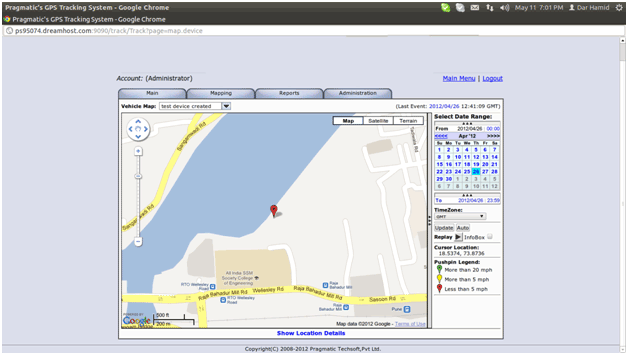
Pragmatic OpenERP Fleet Management and GPS tracking system

Pragmatic Fleet Management and tracking system (Open Source GPS Tracking System) is intended to provide a generic back-end web-based service for querying and viewing GPS related data. It is desgined to operate independently of any specific GPS tracking device or protocol, but comes with support for several device protocol formats (such as OpenDMTP - Open Source Device Monitoring and Tracking Protocol).It is specifically designed for use in small to medium sized commercial enterprises wishing to take advantage of GPS tracking for "fleets" of vehicles. However, Pragmatic Fleet Management and tracking system is highly configurable and scalable to larger enterprises as well.

Web-based

  1. Track Fleet, Employees
  2. Multiple users

    GPS tracking device independent: 

    Devices from different manufacturers can be tracked simultaneously.
    •   Android smart phones
    •   GPS data logger with automatic Wi-Fi upload, for in-cab Windows-based computers.
    •   "NetGPS" capable devices.
    •  Most TK102/TK103 tracking devices (those using the common TK102/TK103 protocols)

        Customizable mapping service

        1. Support for OpenLayers/OpenStreetMap in addition to support for Google Maps, Microsoft Virtual Earth, and Mapstraction (which provides mapping support for MultiMap, Map24, MapQuest, and more)
           

        Customizable reports

        Detail and summary reports can be customized to show historical data for a specific vehicle, or for the fleet.

        Vehicle associated with GPS device


        Vehicle History


        Real time vehicle position


        Fleet Management

        Key Features

        •   Maintainence of Fleet history including all the relevant details of the Fleet like Model No., Engine Volume, Seats, License Plate, Fuel Type, Registration details, etc.
        •  Maintains a complete record of the Driver details like Name, Driving License, etc.
        • Maintainence of Insurance Details.
        •  CMMS (Computerized MaintainenceMangement System) for recording & analyzing various maintainence activities of the Vehicle.
        •  Management of Fleet Maintainence Contracts including the Fleet Maintainence, Quotation, Fleet Maintainence Orders & its Invoicing.
        •   Fuel Tracking which would help in monitoring of Fuel consumption.
        • Odometer Statements specific to the vehicles.
        •  Configurable Master Data including Vehicles, Service Templates, Service Tasks, Insurances, Fuel Type, Driving Licences, etc.
        •  Accounting Module to meet all the financial & billing needs of the company. Its closely integrated with all other modules.
        • Sales Module to manage all the sales transactions of the company.
        •  Purchase Module to manage all the purchase transactions of the company.
        •  Warehouse Module to manage all the Inventories & Warehouse requirements of the company.
        • Provision to generate the Work Orders for maintainence of the equipments& assigning the Spare parts required.

        Variety of Customizable Reports like

        •    Vehicle Reports.
        •   Fuel Consumption Reports.
        •   Driver Reports.
        •   Fleet Maintainence Reports.
        •  Odometer Statement Reports.
        •  Financial Statement Reports like P/L(Profit & Loss statement), Balance Sheet, General Ledger, Trial Balance.
        •   Invoice Reports. & many more such type of reports.

        Wednesday, April 18, 2012

        Print Button for List View in OpenERP

        o get print button which will print all records listed in list view in pdf format, you have to add few lines and methods in java scripts and mako file.
        To print report, open list view of any form, you will get PRINT button before PROCESS button at right corner as circled in the screenshot. Here, I have opened Partners form’s list view.

        Now select the records and click on Print button as circled in the last screenshot. If there are no other reports available for the list view then it will print directly the report otherwise it will direct you to the new screen.
        Here, in partner form we have two other reports available for the list view, so button will open new tab in your browser.
        Now select PRINT SCREEN as circled in the last screenshot and hit OK button. This will print the report for the selected record in pdf format.
        Here you can see the Partner report with all the details.

        Securing OpenERP Web Client ( Security OpenERP )