Monday, July 23, 2012
New Features Developed in the OpenERP POS (Point of Sale) - Password required for the POS Validation part
Provision made in POS where manager can login once and later the sales rep can login by just entering password. No need to enter user name each time. The system will map the password and allow the valid user to create the new Order with his name.
Once POS order is complete he has to re-enter the password for new Order.
POS order will be generated with name of the salesperson that has entered the password so any change in salesperson looking after the counter he needs to renter his password to make a new order. So the new order will be processed in the name of the new salesperson that entered the password.
- Ease in analysis of sales made per month by each sales person.
- Draw Reports for specific time period per salesperson.
Password Validation Screen
Reports Screenshot:
Wednesday, July 18, 2012
New Features Added to Fleet Management in OpenERP- Route Optimization and Maps
1. Route Management System is continuation of Fleet Management System.
2. Route Management System can generate best Driving paths between two or more than
two Addresses.
3. Addresses selection can be made between Partners i.e. Customer or Supplier, warehouses, Current location of any Vehicle or it may be GPS location of any Employee.
4. We can select all the possible partner addresses which come in between the selected route within a given(supplied by user) radius of kilometers.
5. We can see Graphical maps of the Routes Generated.
6. This module generates most Optimized Paths.
7. It gives us the total driving distance in Kilometers.
between a route will be saved in the Partner Invoice.
Thursday, July 12, 2012
Pulling Data from multiple Magento Stores in to OpenERP
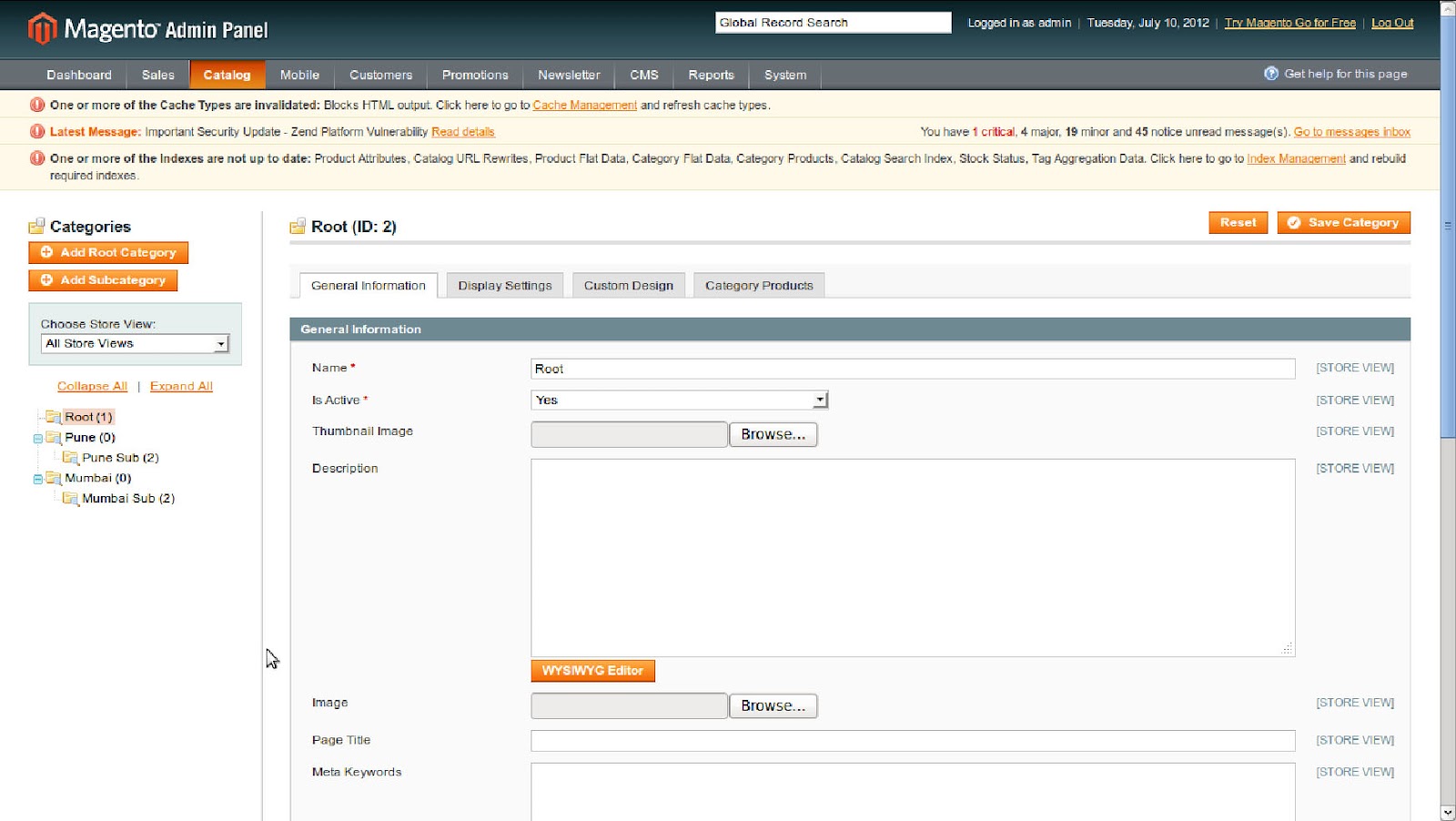
Magento OpenERP connector is a very useful tool to integrate Magento stores with OpenERP. It allows exports and imports of product catalog and orders. This allows users to pull data from Multiple Magento sites in to OpenERP. One can differentiate between the products and orders coming from Multiple Magento stores. This is really useful for clients who are running multiple stores and can manage all of them via single OpenERP instance. The following shows how to configure this.
1.Here we have created 3 Stores and 3 Websites.
- Main Store – Main Website
- Pune Store – Pune Website
- Mumbai Store – Mumbai Website
4. After Importing Data from magento to openerp you will find websites.
5. Products after Import.
6. Products view in Perticular Store and Website.
Friday, June 15, 2012
Manage Annual Maintenance Contracts (AMC) with OpenERP
Contract Management
- AMC for products or customers
- Response time setup
- Multiple products per contract
- Reminders for renewal of contracts
2. Here is the form view of the contract management
We have created a contract here for maintenance of the products provided for different partners in different cities in India.
In the contract lines you can add the products in the contract with response time.
Also we have provided a reminder so that a mail will be sent to the customer to renew the
In the contract lines you can add the products in the contract with response time.
Also we have provided a reminder so that a mail will be sent to the customer to renew the
contract before the end date.
3. You can send a mail using this Contract Created Mail Form wizard.
Friday, June 8, 2012
Business Intelligence For OpenERP Using Jasper Dashboards
Alway's We heard that Customer's would like to see dashboards in CRM. Pragmatic provided easy solution which integrate OpenERP – Jasper reports in CRM.
We have Developed OpenERP Sales CRM module with Jasper Dashboards which provides Analytical view to the Sale's CRM data, using this data managers or sales user can take corrective action when required.
OpenERP Sales CRM Dashboard offers significant new and enhanced features that can increase effectiveness and productivity in your sales team and organization.Using Jasper dashboards Reporting mangers can understand sales funnel's effectiveness and sales representatives performance.
CRM Business Intelligence Using Jasper Reports
OpenERP Sales CRM Module - :
- Sales CRM track all details of Leads, Opportunities & Sales Funnel.
- Create User Hierarchy ( Management - Reporting manager – Sales Representative)
- Provide Access rights as per users and groups.
Using Jasper dashboards we can analysed -:
- Target by Users/Sales team- Yearly, Monthly, Quarterly & half yearly.
- Estimated and achieved target by users and sales Teams.
- Booking revenue by Individual and Sales teams can be analysed.
- Sales Funnel – Region, Solution & Sales person wise.
- Monthly Lead generation details
- Opportunity Won percentage.
- Key Performance indicators
- Contribution of top orders
OpenERP Sales CRM Connect with Jasper Dashboards -:
- OpenERP – Sales CRM data integrated with Jasper Dashboards
- Developed module connects OpenERP and Jasper dashboards
- We can export user's to Jasper server.
- Once we login into openERP we do not need to login by user into Jasper.
Below are some screenshots of OpenERP Sales CRM – Jasper Dashboards :
2)Leads Generation dashboards – provides Userwise leads generation details and percentage of won.
3)Stage wise dashboard
4)Sub category dashboard :
Using above dashbaords Salespeople are motivated to accurately update their opportunity data in the system so they don’t run the risk of being called out for missing or inaccurate data.
Deploying OpenERP with Chef
What is Chef -
Chef is an open-source systems integration framework built specifically for automating the cloud.
With Chef, you write abstract definitions as source code to describe how you want each part of your infrastructure to be built, and then apply those descriptions to individual servers.
The result is a fully automated infrastructure: when a new server comes on line, the only thing you have to do is tell Chef what role it should play in your architecture.
Chef is an open-source systems integration framework built specifically for automating the cloud.
With Chef, you write abstract definitions as source code to describe how you want each part of your infrastructure to be built, and then apply those descriptions to individual servers.
The result is a fully automated infrastructure: when a new server comes on line, the only thing you have to do is tell Chef what role it should play in your architecture.
Chef is a systems integration framework, built to bring the benefits of configuration management to your entire infrastructure.
With Chef, you can:
With Chef, you can:
- Manage your servers by writing code, not by running commands. (via Cookbooks)
- Integrate tightly with your applications, databases, LDAP directories, and more. (via Libraries)
- Easily configure applications that require knowledge about your entire infrastructure ("What systems are running my application?" "What is the current master database server?") (via Search)
- Create perfect clones of QA environments , pre-production environments, partner preview environments and more. (via Environments
Once automated, you hold a blueprint for your infrastructure, enabling you to build, or rebuild, automatically in minutes or hours – not weeks or months. Better still, when you take those environments live and reality intrudes - which, trust us, it will - Chef gives you endless flexibility to adapt on the fly.
Install Openerp on new server
We have to first migrate the required files on the target server by using following command
knife prepare ubuntu@ip
We have created Chef for automatic installation of OpenERP and Postgesql. In this chef, we are going to download all modules form the OpenERP Website with latest version, for now we are using OpenERP 6.0.4 version.
Fristly We install all the Python dependencies for OpenERP by writing recipes in the cookbooks,
Python modules required.
- python-psycopg2
- python-lxml
- python-dateutil
- python-cherrypy
- python-formencode
- python-pydot
- python-setuptools
- python-lxml
- python-mako
Then we are going for the Postgresql installation,
For installing Postgresql 9.1 we have written recipes and with this it also created user “Ubuntu “ in your postgresql.
We fetch OpenERP source form launchpad and install that on the server
If you have own branch or any other version control you can pull the code from there.
Once this installations finishes, we are going to make services for the OpenERP in the /etc/init.d/ by the coping files openerp-server.sh and openerp-web.sh.
Here is how recipe look like
#
# Cookbook Name:: OpenERP server
# Recipe:: default
#
# Copyright 2012, Pragmatic TechSoft
#
# All rights reserved - Do Not Redistribute
#
#########################################
#
# recipes for the postgresql
#
#########################################
package "postgresql"
service "postgresql" do
supports [:status]
action :start
end
Subscribe to:
Posts (Atom)