Friday, October 11, 2013

Odoo OpenERP 7 Integration with Fedex, UPS and USPS

                          Pragmatic Techsoft has come up with OpenERP 7 module which integrates OpenERP delivary orders with worlwide couriers like Fedex,UPS and USPS inorder to generate Rate for shipping and Shipping Labels.
                          This is a comprehensive web based shipping integration module used for getting shipping charge details from shipping above agengies according to Service Type;Pacakage Details;Pacaging Type etc. 


                        Below mentioned are the key features of shipping Integration which can be configured & customized as per clients requirment:   

Key Features:  
1) Integrated with FEDEX, UPS,USPS
2) Generating rate of shipping according to weight of delivery order, type of shipping service used and shipping agency selected for delivery of order.
3) Integrated with different service types like Local, Internation, Airbill etc.
4) Generates label along with tracking number , barcode and DataMatrix code.
5) Download and Print shipping receipt.

Once user confirm sale order respective delivary order is generated from where user can select which shipping agency will be used to deliver order.  
A) FEDEX  

 1.Generating Shipping Quotes for FedEx  

Once delivery order is creted user has to specify Weight of Delivery order;Shipping Type,Dropoff Type,Packaging Type. When user click on Generate Shipping Quotes request is send to FedEx which returnes cost of shipping according to specified weight and selected shipping Type. 
 

 2.Request to Generate Shipping Label for FedEx  

Once user get shipping cost he can request to generat label of shipping i.e Receipt of Shipping which is in image form that can be downloaded and printed any time. 
 
 3.Opening Shipping Label For FedEX 
 
 4.Shipping Label Details for FedEx 
 
 5.Shipping Label For FedEx 
 
 Similarly user can generate shipping charge and label for UPS and USPS.  

B) UPS  

1. Generating Shipping Quotes for UPS 
 
2.Label For UPS 
 
C) USPS

 1. Generating Shipping Quotes For USPS 
 
 or USPS 
 
User can use all Shipping agencies (FedEx;UPS and USPS) at once to generate rate and label. 
 
 Generated Shipping Quotes 
 

Tuesday, October 8, 2013

Odoo OpenERP 7 Cloth and Fabric Trading

In this module Pragmatic tried to capture basic features and flows which are included in Textile indusctries order management process. In Text tile industry Sale order are manage in different way that our default flow. Here Sell Order has more stages and more player are invoilved in discion making. In this Module we have focuse on Following things:

1.A Company can have multiple selling points (shops) in given territory and sale discount allocated to each shop varies.
2.Customer will order sample of product (cloth;carpet;fabric etc) befor actually placing confirm order.
3.Tracking of sample flow right from its request to confirmation.
4.Get stock confirmation from supplier.
5.Tracking of Sell order states from New to Back Order or Invoice Due so that user can handle high prority order first.
6.Percentage or Fix amount sales commisions to shops.
7.Product Handling thorugh SKU or Design code/Color combination.


Now Lets see these features in Details 

 1. Product 
  In this Product is combination of Design Number and Color . These two factors produce a Unique Name or SKU to Product which act as identifir to it. 

You can also specify supplier details on product form  


 2. Sell Order 
  We have customize present OpenERP sell order form to show more information on it.  


 2.1 CFA Request 
  CFA is a sample request for customer . CFA request is generated from sell order Form itself . When CFA sales personell request CFA on behalf of customer a new record is created in Warehouse for supplier (assuming supplier has aceess to warehouse module). Supplier sees new CFA request and send sample to cusomer he can also specify his comment on same.  

CFA status also be monitored from Sale Order. 

 2.2. Product Availability 
  When Ever a Order is created in system one request is generated in Warehouse regarding Reserver Request which is nothing but product availability request to supplier once supplier change state of Reserve Request to Available at very moment sell Order Satus is change to RES-(Reserved) 

 2.3 Order/Release 
  Once Order is in RES state sales person can mark that order as finale order and make payment entry for same. Some time he can skip payment and idrectly reale order and collect payment latter on (as per business rule)  

 2.4 Back Order 
  Some time product ordered is not available with supplier which changes sell order state to Not-Available. If customer is ready to place Back Order he has to pay 40% of total order amount upfront.  


 2.5 Commision Handling 
  Each shop gets their commision based amount of sale they done either in percentage or fixed amount  


 2.6 Delivary of Product and Closing Order 
  Once product is delivered to customer and full payment is done againt that order order get Closed  


Thursday, September 26, 2013

Odoo OpenERP 7 POS (Promotional Schemes Management)

                              Product promotional schemes offered in retail industry has great impact on total sales turnover of business. No doubt that promotional schemes offer series of benefits to the industry than any other business communication can.
                             This module helps user to create different promotional schemes that suits to their business. promotional schemes created in OpenERP shall be utilize in POS module so that billing will be generated based on promotional schemes. 

Promotional Schemes can be configured for :
         1) Specific product category/ products
         2) Specific date range
         3) Different locations/ branches
Following are the types Promotional Schemes :  
 1) Buy X, Get Y Free
     This method user can offer Y products on discounted prices against the purchase of X products  for stipulated quantity. 

There are two subtypes for this scheme as follows
   A. For Same products :  
   In this case same products are offered at discounted price against purchase of stipulated quantity of products   
                                      eg : Buy 1 Pizza Get 1 Free
                                             Buy 3 T-shirt Get 1 Free   

  B. For Different Products :  
   In this case discounted prices are offered on Different products that actully procured.   
                                      eg : Buy 1 Computer Get 1 Headphone Free
                                             Buy 2 Trousers Get 1 T-shirt Free.  
                                             Buy 20 KG Rice and GET 1 Kg of Sugar Free                                                    Get TV Tuner at 50% Disc. with 1 Compaq Laptops 
 

2)Unit Price Discount (Amt.) :
     In this type of promotional schemes user can directly set unit prices for selected products. Unit price can be set for different slabs of quantity procured.   
                                      eg : Buy 2 Shirt at Rs. 500 each
                                             Buy 3 Shirt at Rs. 400 each 
 
3)Unit Price Discount (%) :
     In this type of promotional schemes user can offer discount on unit prices for selected products. Discount % can be set for different slabs of quantity procured.  
                                      eg : Buy 2 Shirt at 10% off
                                             Buy 3 Shirt at Rs. 15% off  
 

Tuesday, September 24, 2013

Odoo OpenERP 7 Hotel Management & Web booking engine integration

Internet has provided more ease in room reservation in hotel. Web Booking Engine provides user friendly interface to book hotel rooms through internet. Web Booking Engine is integrated with Hotel Management modules of OpenERP V7.

 
Following are the features available in Web Booking Engine :- 

 1) Easy way to search available rooms for given date range

2) Provision to maintain user credentials  

3) Integration with Paypal & authorised.net 


4) Emails alerts on successful completion of reservations on web.  

5) Integration with Odoo OpenERP database  

Odoo OpenERP 7 Room Availability Dashboard in Hotel Management

Room Dashboard application helps user to have bird eye view on room bookings. This interface helps reception person to see Room availability status for a given date frame.


 Following are the features available in Room Dashboards:- 

  1)Consolidated view of Booking status
 
2)Room availability can be filtered for hotel, room type, and for specific date range,  

3)Quick information for booked room on mouse over. 


4) Maintains reservation records in OpenERP.  

Monday, September 23, 2013

Odoo OpenERP 7 Hotel Management & GDS System Integration

Global Distribution System(GDS) is a network operated by a company that enables automated transactions between Vendors and booking agents in order to provision hotel room booking services to the end consumers. A GDS can link services, rates and bookings consolidating products and services across Hotel reservations.
 

Importance of GDS in hotel industry :
For hotels seeking to tap beyond the local travel marketplace, global connectivity is vital. However, this isn't easy. There are countless number of buyers (such as Travel Agents and Corporates) and sellers (your competitor hotels, resorts, serviced apartments, hostels, etc.) that are a part of the global hospitality niche.

In this competitive and confusing scenario, the GDS network has surfaced as the undisputed answer. Hotels that are plugged into the GDS are ensured of their room nights being distributed across the biggest hotel booking resource. However, the GDS interface can be very challenging for hoteliers. The sheer volume of Travel Agents and competing hotels means that managing your room nights across the GDS can be very time consuming. 

Pragmatic Techsoft Pvt. Ltd. has solved this issue too. Its uncomplicated interface ensures that your rooms are distributed regionally, nationally and internationally without any issues. GDS module of OpenERP shall connects you to the four, major GDSs: 

1.Amadeus
2.Sabre / Travel Network  
3.Travelport
4.Expedia
5.Booking.com
6. HRS
7. Travelocity
8. lastminute.com
9. priceline.com
10. agoda

GDS Network Architecture:
Following are the features available in GDS system : 

1)Integration with OpenERP database & hotel management module
2)Secured login for OpenERP users
3)Ability to integrate multiple hotels in single database 

4)Room allocations to GDS for a stipulated date frame 

5)One interface to make your rooms visible on more than 4 top ranked GDS systems like Amadeus, Sabre, Travel Network, Travel port  
6)Exclusive room rent definitions for GDS allocated rooms 
7) Synchronization of room booking from GDS to OpenERP.  

Tuesday, September 17, 2013

Odoo OpenERP 7 Geo-Search Module

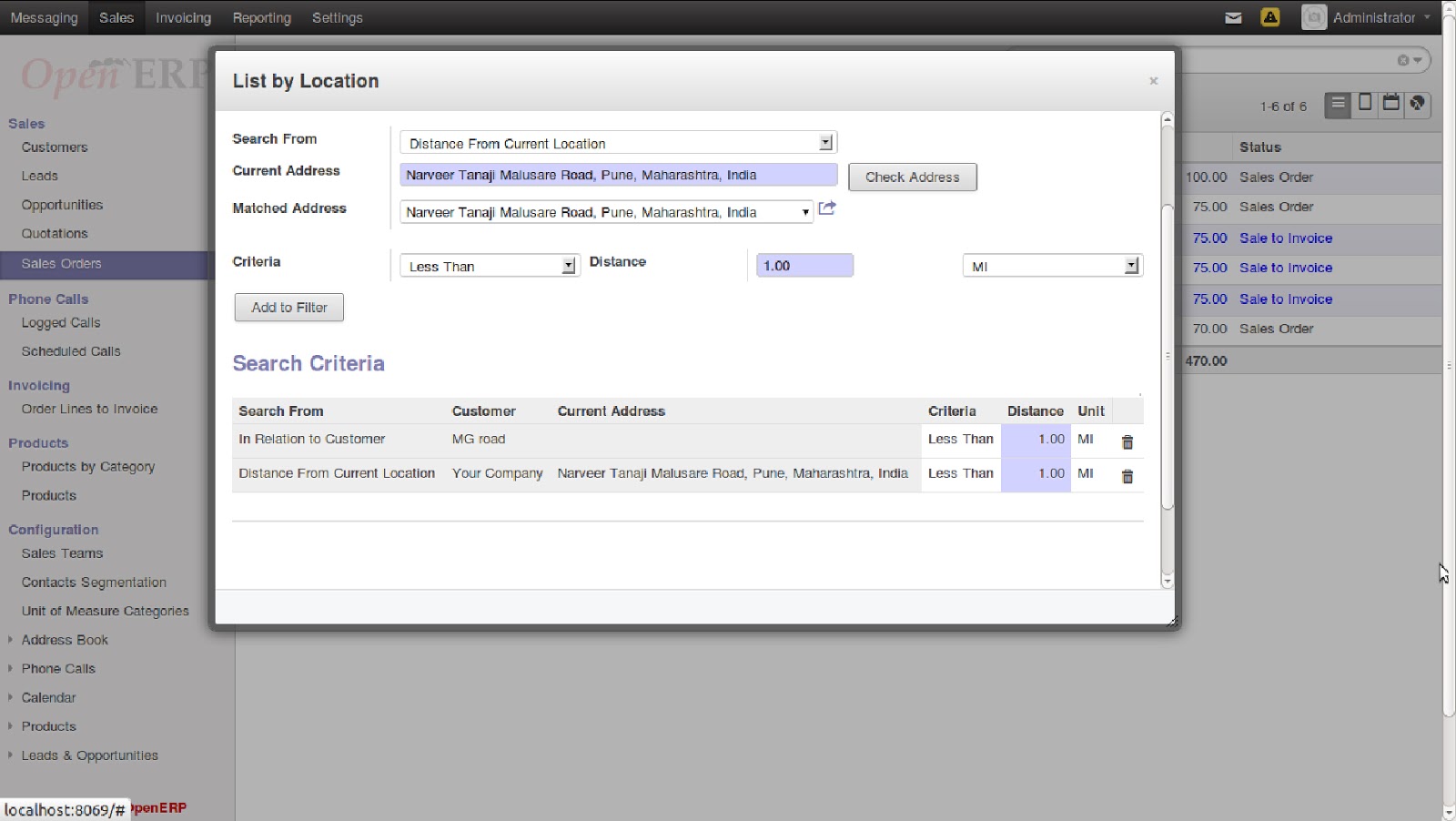
                          Previously in OpenERP-7 Geo Location Module you have seen how to track Geo-location and Route of your OpenERP Partner. In this OpenERP 7 Geo-Search Module we went one step ahead and implemented search (filtration) according to geo criteria specified by users. This is a comprehensive Web Based Geo-Search Module used to effectively search Customers, Sale Orders, Quotations, Lead , Opportunities, Customer invoices according to their Geo Locations criteria. 
                        It would help the Organizations to a large extent in effectively searching Customers, search Sale Orders, Quotations, Lead , Opportunities, Customer invoices within a specified Geo Location.                             
                         It is also allows to plot Customers, Sale Orders, Quotations, Lead , Opportunities, Customer invoice along with details of customer as a markers on Google map and respective information(Customers, Sale Orders ,Quotations, Lead,Opportunities,Customer Invoices ) in information window of Google markers.
                        Below mentioned are the key features of Geo Search Module which can be Configured & Customized as per Client specific needs.   

 Key Features:  
1. Searching Customers, Sale Orders, Quotations, Leads,Opportunities,Customer Invoices, within particular region by specifying the search Criteria. Search Criteria is combination of Geo location(address of partner), Search Radius(in Kilometers or Miles).
2. Get Suggestions for specified address.
3. Saving searches for future use.
4. Specifying Multiple search Criteria
5. Filter on already filtered data.
6. Plotting Customers on Google map along with their sale order history(Total Sale and product details), Leads, Opportunities, Invoices.
 
Let see how this module exactly work :

 1) Getting Search Criteria Window:  


2) Specifying Search Criteria:  


3) Address Suggestion for specified Address:  
This address are derived from Google address suggestions  


4) Multiple Search Criteria:  

5) Save Search:  

6) Using saved Search :  

7) Customers and their sale orders on Google Map: