Saturday, May 10, 2014

Odoo OpenERP 7 Master Production Schedule - Make to stock in OpenERP

Master Production Schedule module is designed to help manufacturers develop an attainable schedule while balancing internal constraints and limited resources and acheiving Advanced Planning and Scheduling. MPS for Make to Stock enables to Schedule the production against stock. MPS balances machine capacity and aknowladges labor to develop a realistic plan of action to move production through various operation steps. The user benefit is that generated schedules are realistic and achievable on the plant floor because the production constraints on the plant floor are considered and modeled.

Key Features
1) Track each Production Order through each respective routing step and know where each part should be at any particular time.
2) Keep track of all required resources for each manufacturing step and know the availability of each resource at any particular time.
3) Represent time in a detailed manner (e.g. minute by minute). Machine run time can be defined as - per hour
4) Schedule orders (i.e. manufacturing steps) only when resources are available.
5) Detailed working Time for work centers.
7) Consideration of preventative maintenance (Resource Leave) and other machine down time in Scheduling.
8) Can be Scheduled for any of the month
9) Routing selection is provided at the time of Schedule generation
10)Multiple Tentative Schedules can be generated and changed before freezing it.
11)Multiple products can be scheduled in one Schedule Plan


In OpenERP we have developed the module for managing the MPS.
Pre requisites for MPS are BOM, Operations, Work centers, Routing, Resource Working Time, Reasource Leave (Down Time).

MPS Record
When we created a MPS record to schedule the product 2909 Assembly, either we can plan for a month or for entire year.
Schedule Details
When we schedule after entering the quantity, we got the following schedule details with the advaced scheduled date and time along with the resoureces. So it gives us scheduled start date and scheduled end date considering the in between operation timings.
When we confirm the schedule it gets freezed and the concerned Manufacting Order gets generated.
When we confirm the Manufacting Order, corresponding Work orders gets generated for each of the operation.

Friday, April 25, 2014

Odoo OpenERP 7 Hijri Calendar

Due to the vast domain and and its flexibilty amoung various nations ,OpenERP's current adoption of Gregorain Calender can't be confined to ease its expliotation. Localization (globalization) of OpenERP has led to the essence of developing of widgets(sub-modules) that can potentially be adapted to various languages and regions.As we know different countries have different economic conventions, including variations in local Holidays,TimeZones,Jot representation etc , where it become mandatory to have local Calendars for meeting their Business Requirements.

Apart from Gregorain calendar their are many diffrent calendars used throughout the world synchronized with the cycle of the sun or the moon, infleuenced by Solar or Lunar Revolution and Rotations.We have tried to implement OpenERP 7 Widget that provides implementations of various world calendars and other additional functionality related to the calendars.Several world calendars can be implemented in OpenERP 7 .Here we are Depicting only the Demo of islamic calendar:

Islamic Calendar(Hijri Calendar) :
Commonly known as Hijri Calendar synched with moon(lunar) and mostly followed in all Muslim countries, orginated since AD 622 during the time of emigration of the Islamic Prophet Muhammad, known as the Hijrat, occurred.There is no year zero, time scale goes like 1 BH (-1) was followed by 1 AH (+1).Leap years follows after every 30 year cycle.Each year has 12 months of between 29 or 30 days and 354 or 355(leap year's) days in total.The week is starts with Yawm-Ahad (Sunday) and ends with Yawm As-sabt (Saturday).The first month of year is Muharram al Haram(المحرّم) and ends with Dhū al-Ḥijja(ذو الحجّة).The current Islamic year is 1435 AH,(AH) prefix used with Hijri Calendar dates for differentaition.

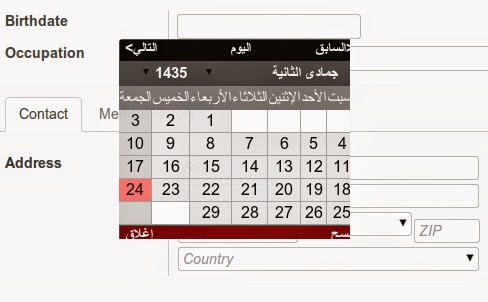
Below screen-shot shows Islamic calender integrated in OpenERP 7 .
The Calendar is Designed in such a away that it displays the hijri dates as digits and the name of months and days in Arabic language.(That Can Be further customized To More then 50 Languages including English,Persian,Urdu, Thai , Nepali , Ethopian , Julian, Hebrew and Hindi). The Calendar works same way as the inbuilt Gregorian calendar does.

Monday, April 21, 2014

Odoo OpenERP 7 Training Management

Training and career development are very vital in any company or organization that aims at progressing. Training simply refers to the process of acquiring the essential skills required for a certain job. It targets specific goals, for instance understanding a process and operating a certain machine or system. Career development, on the other side, puts emphasis on broader skills, which are applicable in a wide range of situations. This includes decision making, thinking creatively and managing people.

1. Creating Training cost.
This is to configure the training cost per person. 

2. Creating Training Modules for training.
The training module is created with the details like name of the training Module , type of training , Location , cost , Details of the Institute who is providing training , etc. 

3. The training can be initiated by the Manager , HR or the Employee himself.
4. After the manager initiates the training , it is confirmed by the HR.
5. After the HR , the training is confirmed by the Employees.
6. Once All the employees confirm / refuse the training , then training details are sent to the finance Manager for Final approval.
7. After the Finance manager approves the training , the training is booked .
8. Similarly , the flow is maintained for Employee initiated Training and HR initiated training,
9. In the training records , the amount of training per person is maintained. Depending on the no. Of employee approvals and employee Refusals , the training amount per person is calculated.

Monday, April 14, 2014

Odoo OpenERP 8 Features

This blog mentions some of changes which are made in OpenERP Version 8 as Compared to Version 7.

1. HR Module Changes
In HR modules (as well as in other modules like sale,project) “State” concept is removed and now we only have Stages which i think 

Removed Concept of State on Hr Application . Now only Stages are available by Default NEW is Stage. This allows to group and analyze the time spend in the various stages.

Similar change has been done for project issues and CRM leads where state is removed. Now we have only stage which determines on which state current record is.


Added template_id field. If an email template is linked to the stage, it is used to render and post a message on the applicant. This allows for example to have template for accepted or refused applicants. 

 
1.1 Reporting
In Version 8 reporting feature is more dynamic which makes user to change format of report easily and has option to use different filters easily. 
 

2. CRM 
2.1 Teams Management
This feature allows user to create team and track their progress in terms of Leads;Sales Orders and Invoice . It provided easy interface for team management and performance tracking. 
 
2.2 Mass Mail
This is again a good feature for CRM where users can create campaign and send mass emails. It also allow users track emails visibility.  
 
2.3 Live Chat
OpenERP 8 provides live chat option to directly chat with your customer in Real Time.  
 
3. Accounting:
3.1 Paypal
OpenERP version 8 provides interface to configure paypal and allow option to make payment from Paypal. In Version 8 you can configure company paypal account and you get option to register payment from Sells Order directly.  
 
Paypal Option on Sells order form
Similar Option is Provided for Ogoan and Adyen 

3.2 Bank Reconciliation
Advance option to bank reconciliation is provided. 
 
4. Website
OpenERP 8 comes up with this feature of web where users can design and manage content of their website . This Option provide and option to Manage web content;Products and other details which is generally put on any company website.  
 
5. Display Option in Search
Display option in search gives user an option to add extra column in tree view.  
 

Tuesday, March 25, 2014

Odoo OpenERP 7 Resource Management

This module deals with management of Resource on Various project according to their skill sets. Lets go through various features available in this module.

1) Employee Details :
Human resource team can capture various details of Employee like General Details, Previous Work Experience, Skill, Present Employer details etc.

2) Create Resource Request:
When there is need of resource on particular project manager create resource request which define skill sets of required resource along with other details.

Manager can status of all Resource Request created for particular project
3) Search Resource for New Resource Request
All Resource request created by managers are available to HR team for further processing. HR personnel search for Resource which suits resource request requirement and Propose some resource to request which match R-R criteria.
After Searching resource for particular request HR team can propose number of resource to managers for finalization
Allocate Resource
Once Manager finalize one of proposed resource HR team add that resource to Project specified in R-R.

Wednesday, March 12, 2014

Odoo OpenERP 7 Check Management

Pragmatic Techsoft Pvt. Ltd. has developed a functionality to manage Check Transactions. It maintains status of each cheque entry (i.e. Released or Bounce). Multiple expense or income heads can be captured in single entry.
Following are the features available with Cheque Management :
1) Single entry screen “Cheque Management” for all type of Payment / Receipt transactions

2)Allows Customer Payment, Supplier Payment, Expense Entries, Income Entries in through single form

3)Linking of with journal entries

4)Provision to “Release” or “Bounce” Cheques

5)Auto reconciliation of accounting entries based on Invoice, Payments and Actual Bank Release entries.

Odoo OpenERP 7 Magento Integration – import of multiple currency prices from Magento to OpenERP

Pragmatic Techsoft Pvt. Ltd. has customised Magento – OpenERP connector in order to import multiple prices of same product in different currencies from magento to OpenERP. In real time scenario retailers don't want to set price of product based on currency exchange rate but it is a fixed price in different currencies.

OpenERP – magento Connector and Product master in OpenERP is enhanced to accommodate prices in different currencies.

“Innoexts_AdvancedPricing” extension in magento allows user to define multiple currency prices for same product in magneto
In following screen, you can see there are 3 currency fields viz. 'EUR', 'GBP', 'USD' which holds three prices of same product in Euro, Pound & US dollars.

This offers two way sync I.e these prices can be exported to magento for respective products.