Wednesday, January 28, 2015

Odoo OpenERP 8 Veterinary Management System

Odoo 8 Veterinary management software by Pragmatic is a complete solution for Vetrinary Management system. It includes managing clients, animals, financials, stock, reminders, lab integrations and much more.

It is perfectly tailored to suit small animal, referral,emergency & specialist, mixed animal and equine veterinary practices. The system can be made Cloud based , thus , the system can be accessed anywhere and anytime.

Our system was designed from the beginning to reflect the nature of multi-branch practices where anyone can search across the entire client database regardless of location.


 The following are some features of Veterinary Management system.

 1.Animal diseases and disease categories are preconfigured in the system.
 2.User can Create Patient with information like name , Pet-owners details , pet-owners address ,
 3.Patient Family records are created per pet owner. All the pets belonging to one owner are in one family
 4.Appointments can be created for the patients
 5.Prescriptions related to the Appointments can also be added.
 6.Records of the patients admitted in the hospitals are created. In this , information like Diet and Nutrition of the patient , care plan etc are added as well.
 7.ntensive Care Unit Details of the patients like
a.GCS ( Glasgow comma Scale )
b.ECG ( Electrocardiogram )
c.APACHE ll Score ( Acute Physiology and Chronic Health Evaluation 2 Score )
d.ICU
 8.New Born Record can be created in which details like Neonatal Signs and Symptoms , Neonatal Reflex check etc can be recorded.
 9.Invoices for the services provided in the hospital can be created. They have direct effect in the balance sheet. The invoices are created against the pet owners .
 a. Appointments to be invoiced.
 c. Prescriptions to be invoiced.
 10. Many reports can be printed by the system. These help in Efficient Decision making and Management of the hospital
a. medicament list Report.
b. Appointment Evaluation per doctor report.
c. Appointment Evaluation Per medical health servive
d. Appointment evaluation per prescription Report .
 11.the website is provided with teh system which can be utilised by the hospital for various purposes like information to the patients , publicity and reach out to people.
 12. The events and blogs can also be published on the website.

Saturday, January 24, 2015

Pragmatic Odoo OpenGTS Integration

Pragmatic Odoo OpenGTS integration is a state of art solution for all tracking (geolocation) needs of a company, be it Vehicle tracking or Personal tracking. The Pragmatic’s Module is developed in such a manner that it would suit for all scenarios with the powerful Odoo(formerly OpenERP) modules to match for multifarious industries.

GPS devices: The Pragmatic Odoo OpenGTS module is capable to handling any type of GPS devices and all related information can be captured in structured manner in Odoo. (Limited by OpenGTS device support).

Android Mobile devices: The module also has the capability to integrate Android Mobile devices tracking from OpenGTS.

This write-up details the tracking capabilities of Pragmatic Odoo OpenGTS We are using two type of devices to demonstrate the power of the Pragmatic Odoo OpenGTS module

1. GPS devices Personal Tracker (Sanav GC-101) &
2. Mobile application (CellTrac).

Note: It is mandatory that while configuring the application that the user mention the type of device to add.

Odoo OpenGTS Configuration

 1. Adding Device
- Fleet → Vehicles → Device Configuration → Device Information
- Create a Device and fill in the Device Detail
Note: Device Id field should be Device IMEI number


 1.1 Adding Open GTS User - Click on OpenGTS User → Create and Edit

 Note : OpenGTS Account should be “sysadmin” user should be “admin” and password should be “sysadmin”.

 2. Attaching Device to a Vehicle.
- Fleet → Vehicles → Vehicles
- Select a vehicle to which the device is going to be attached

 - Edit and Goto the Device details tab
- Click on “Add an item”


 2.1 Select/Create an appropriate device from the window and click on “Select”

 3. Adding / Registering the device to the OpenGTS server (if not added before)Click on the “Export to OpenGTS”
 4. Tracking the Device on map- Once the Device is added successfully to the Open GTS server, it can be tracked by clicking on “Show Map” button
 - All the successfully added devices i.e. GC-101/Mobile can be tracked here by specifying the device into the “Vehicle Map:” drop down- Tracking of GC-101 is shown below:
 - Configuration of CellTracGTS Mobile App
   To add Android mobile to be tracked on GTS Server, the mobile should fulfill the following prerequisites.
- Mobile containing Android Version 4.0 or more
- Mobile must contain GPS
- Working GPRS network
- CellTracGTS App (Available on PlayStore)


Once the “CellTracGTS” app is downloaded and installed, it must get configured with the server to send and receive data. The configuration of the CellTracGTS is as follows:

1. The Read-only field “Mobile-ID Type” is the IMEI number of the Mobile which should be exactly added and Exported to the GTS Server through OpenERP OpenGTS Module. It consists two fields i.e. “IMEI” and “Android ID”. Selecting any of them will not affect the server but the same thing should get added to the server. (Its recommended to select IMEI)
2. The field “Server URL” is the Server URL to which the device is suppose to send its data. And it should be exactly “http://gtsserver/gprmc/Data?”
3. Followings are the Screenshots the CellTracGTS application configuration


- Tracking of the vehicle using Mobile Phone is shown Below:
- All the successfully added devices can be tracked on the map by selecting it from the “Vehicle Map” Dropdown.

Here we had seen how the settings in Odoo had been integrated with OpenGTS and the devices configured in Odoo are tracked in OpenGTS.
Feel free to contact us at sales@pragtech.co.in for any further enquires/ details required.

Odoo OpenERP Store/ Shop wise Tax Application

This blog represents enhanced Odoo feature which is related to handling of Taxation through shops/store

In Odoo, we currently handled Taxes based on Product defined/default taxes. This is standard behaviour which can be altered if in case. Taxes are Customer driven, mainly location based. This is achieved through fiscal position where Product Taxes can be replaced with new set of Taxes as per configured in Fiscal Position.


 But if we consider scenario where physical stores are located with point of sale or online sales channels which are driven by store wise taxes, Odoo doesn't provide that facility.

 To handle this condition, we at Pragmatic had developed a module which will take care of shop/ store wise taxes configured and applied on sales. For this it is require configuring default taxes at shop level which will carry over in transactions. This will override Product based taxes on transactions. More over if you don't configure shop wise taxes it will follow the normal/default functionality of Odoo which is product based taxes.

 First of all we define tax on Product say Tax 15%.

We will go ahead and define tax on Shop which will take priority in transactions. So define Tax on shop/store.

If you create Sales quotation with the particular product then it will pick up the taxes from the shop as shown in the below rather than taking the default product taxes.


 You can define different taxes per shops or stores if there multiple physical shops/stores.
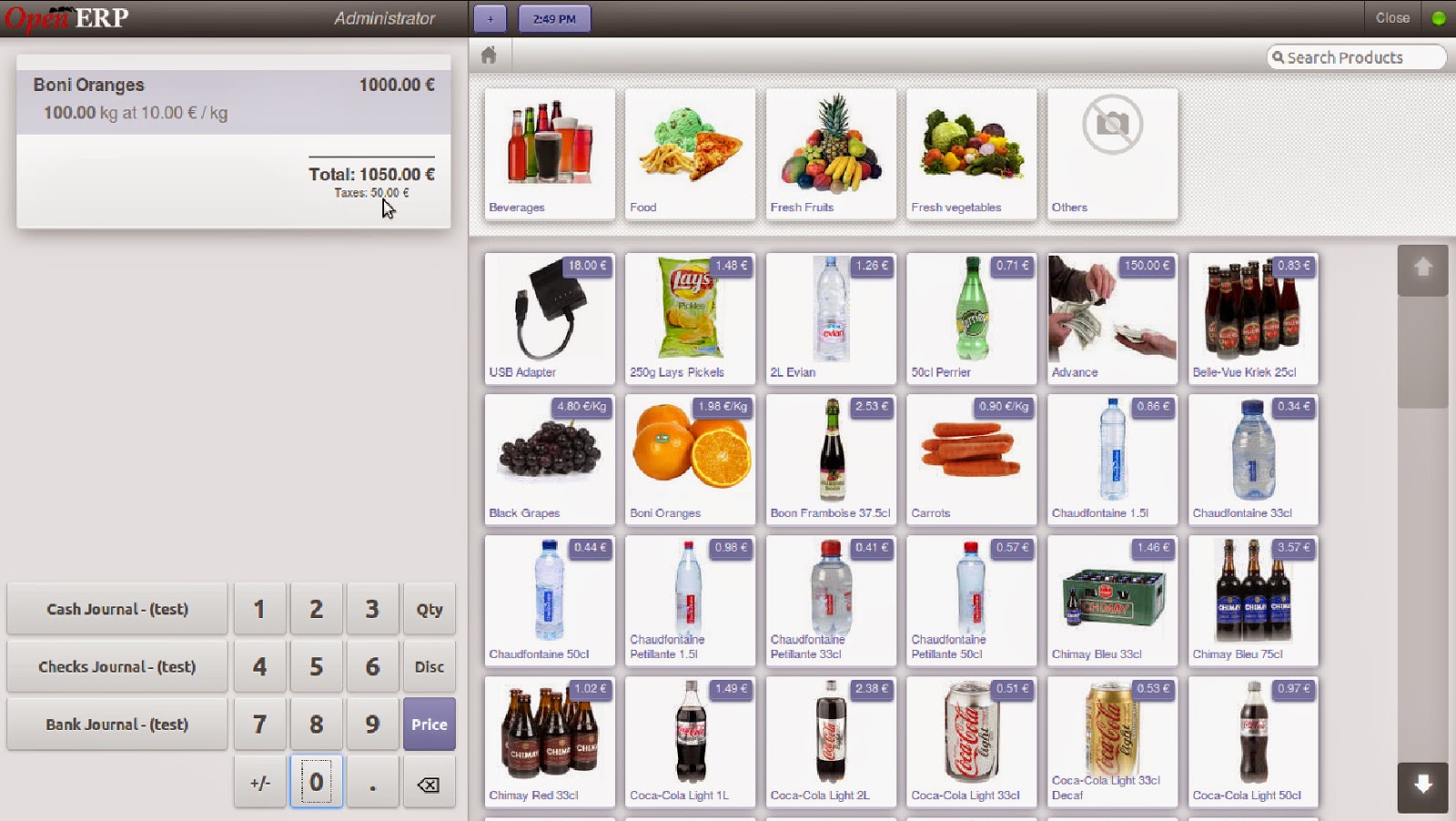
Now we can go to Point of sales and start the selling session. When we select the particular product Taxes will be applied which are from shop instead of product.


 Similarly if we have multiple online stores for which we can book normal sales orders, this will enforce the taxes appropriately.

This will work with third party e-commerce connector as well where online store taxes can be configured accordingly and same will carry forward in Odoo.

Thursday, January 22, 2015

Odoo OpenERP 8 University Management System

Pragmatic has introduced the latest version of University Management i.e. Odoo 8 University Management System by Pragmatic Techsoft.

This system is a complete solution for University management. It comes with several features like Student management , Library management , Transport management , Exams mangement etc.


 The following are some features of Odoo 8 University Management system.
 1.Admissions
This form keeps track of people came to take admission thentrough this their admission gets confirmed and that cadidate becomes a student of school/college. By clicking on open student profile button user get diverted to student profile.
 2. Student Profile :-
All the details of students like the assignment of that student,health related information and educational history of that student is also maintained.
 3) Faculty :-
Information of faculty is maintained through this form. Time table of that teacher as well as the subjects he teaches and library details related to his is also maintained.
 4. Time Table :-
Time table for the students is generated by this wizard.
 5) Library :-
library details are managed properly through this. Allocating a library cards to students and faculty. Keeps track of issued books and requsted books,authors and publishers as well of the various books and their movements.
 6.) Classroom Management :-
The record of the classrooms means which classroom is allocated to which class and the facilities (projector , light,fans etc) available in that class room.
 7) Exams :-
Exam information like exam template, exam sessions,criteria for the exam and resourses allocated for the exam as well as the attendees of exam are also manages through exam section.
 8) Result :-
Result of students of various exams is recorded. The marksheet of the student can be printed and the result templates also can be created.
 9) Hostel Management :-
Manageing the hostels in the school/college and the intake of hostel and the capacity of individual rooms and information of rent of the room allocation date and students to whom it is allocated is possible to manage.
 10) Students Migration :-
Students Migration from standerd to stanard is done. Those students who are passed in 1st year are sent to 2nd . And the standard of students gets changed and the new admission form for next year is automatically gets filled.
 11) Placements Offers :-
Information of placements offers to student get is also maintained.
 12) Transport Management :-
Information regarding the transportation facility provided by the school/college is managed. The routes of the transportation facility as well as the information of vehicle and the driver is also managed.
 13) Parents :-
Information of the parents of students is also managed.
 14) Fees structure :-
Predefined fee stucture is created to charge that much fees from all those students.
 15) Fees Register :-
Information of Fees register is also managed
 16) Attendence :-
Daily attendence and monthly attemdence of a any particular class is managed.
 17) Blog :-
The university can create blogs and publish articles .
 18) Website
The university can also use website for various purposes like admissions , publicity , accepting job requests and awareness . We can use various themes for the website.