Monday, May 9, 2016

Odoo9 Manufacturing Management System


Company has developed many features in Odoo 9 Manufacturing Management module which helps in supporting and accelerating the business. This Product comes with many features like Sales to


Configuration To Use complete functionality of Manufacturing Management we need to configure.
  1. Routings
  2. Operations
  3. Properties
  4. Property Group
  5. Work Centers
  6. Resources
  7. Plant
  8. Working Time
  9. Resources Leaves
  10. Warehouse management
  11. Product Categories
  12. Delivery Methods
Routing
Manufacturing -> Configuration -> Routing
Here you can define all routing related to your manufacturing business which will be again linked with operation and its sequence.
Operations Manufacturing -> Configuration -> Operations
User can define all Operations of its company here at this location.
Properties
Manufacturing -> Configurations -> Properties
Property Group
Manufacturing -> Configurations -> Property Group
Working Time
Manufacturing ->Manufacturing -> Configurations -> Resource -> Working Time
User will define the resource time which is getting utilized for any manufacturing related work.
Resource Leaves
Manufacturing -> Configurations -> Resource -> Resource Leaves
Warehouse Management
Manufacturing -> Configurations -> Inventory -> Configuration -> Warehouse Management -> Warehouses
Product Categories
User can define all type of product categories at this location.
Delivery Methods
All Delivery methods which are used in company can be defined here at this location:-
Sales Order
User will raise quotation at following location and can be process it to Sales Order:-
Sales -> Quotation
MPS
Master Production Schedule
You need to select the option either ‘Make to Order’ or ‘Make to Stock’. If you select ‘Make to Order’ then system allows selecting the Sales Order which you can link while for ‘Make to Stock’ works as Forecasting.
Here we are selecting Make to Order and select our SO which we have raised in earlier topic.
MPS
Now Go to Manufacturing -> MPS -> Schedule Details
User has to select Confirm button it moves to Manufacturing order.
Manufacturing -> Manufacturing -> Manufacturing Orders
Select your Sales Order and click on ‘Delivery’


This complete the cycle of sales to despatch with Manufacturing business.

Wednesday, April 6, 2016

Odoo 9 Pathology Lab Management System

With Odoo 9 Pathology Lab Management System, Pragmatic has launched another new and advanced Product in the field of Pathology Lab Management. This Product comes with many features like Patient information Management, Appointment Management, Laboratory Management, and Invoices Management.

 
Following are some features of Pathology Lab Management.

1. Lab Testing Unit are pre-configured in the system.
2. Lab Testing Types are pre-configured in the system

3. Patients details can be maintained along with Lab Tests Undertaken.

4. Patient Appointments for lab test can be booked.

5. System manages the details of the entire Pathology clinic.

6. Details of all the Physicians related to Pathology clinic are maintained.

7. Medical Specialities are also managed.

8. Lab Requests are managed in the System.

9. Lab Tests Results are managed in the systems as well.

10. Reports in Appointment

11. Patients Report

12. Lab Test Result Report

13. Pathology Clinic Report

Wednesday, March 23, 2016

Pragmatic Techsoft and Maharashtra Institute of Technology, (MIT), Pune joins hand to develop new generation of IoT Products in the cloud.


Pragmatic CEO, Shabbir Merchant along with Dr Mangesh Karad, 
Secretary and Trustee, MIT Group of Institutions


March 23,Pune india
Pragmatic Techsoft Pvt Ltd has been a leading provider of open source enterprise solutions for over 7 years. MIT College of Engineering, Department of Information Technology, Center of Excellence has joined hands with Pragmatic Techsoft Pvt Ltd to jointly develop next generation Amazon AWS IoT cloud based applications. In the future both institutions plan to work on integration of IoT with Enterprise software such as Odoo ERP. Also in the works is to build a Analytics Engine which can learn from IoT data and make predictions to solve problems in Manufacturing, Warehouse and other verticals.

Sunday, March 20, 2016

Odoo 9 University Management System

Odoo University Management System By Pragmatic Techsoft is now available in the latest Odoo Version (Odoo 9).

University management system module manages the whole process of student admission till pass out from the college/school, like Admission, Exams, Time Table, Student Assignment, Hostel, Library, Transport, etc. Using this system, searching student information is just a few clicks away. System also generates various reports.


System allows user to initiate admission process with an information like fees, due date for fees, academic year, category, course, etc. It allows user to generate invoice against admission.
Student management system allows you to store complete information of student like date of birth, religion, category, blood group, mother tongue, address, educational details, assignment details, library details, placement offer details, etc. This allows you to find student information at one click.

Faculty management system allow you to store complete information of faculty like birth date, blood group, contact number & address, time table, library details, subject details, health details, etc. This system manages the payroll of faculty.

Course management system allows you to define courses which has granted by the university for the students. You can also define section and subject under it.

Standard management allows user to define standards, it refers to students appearing in particular year for particular course. It also allows you to set division, it is nothing but separating batch of students in two or more groups. Allocation of division menu allows you to assign division to students.

Classroom management system allows you to allocate classroom to students. Here you can set classroom name, course, standard, number of students per classroom and facilities available in the classroom.

Educational institute organizes cultural programs/activities, to track those activities system allows you to use activity management system. It has information like activity name, faculty & student name, activity type, etc.

Hostel management system allows user to maintain the records of hostels like list of hostels, number of rooms per hostels, number of students per room, facilities available per hostel, etc.

Most of the educational institutes uses transportation facility for their students and faculties. So to maintain all these data we use transportation management system here. It helps to manage vehicle information, driver information, route information, student and faculty list, stops and cost information.

Exam management system allows you to set exam type (for eg. Semester 1) and exam room. In exam room you can set classroom name, student capacity, course, standard and list of students.

General management allows you to define category (Caste), religion and scholarship for the students.

Academic year management allows user to define year and months for particular academic period like eg. for semester-1 the period will be from March to May.

Attendance management system is used to maintain the attendance of students using the filters like academic class, division and batch. You can maintain monthly and daily attendance of students. System also allows us to print monthly attendance report.

  • A} Monthly Attendance
  • B} Daily Attendance Sheet
  • C} Monthly Attendance Report
Educational institute charges some amount as fees for their academic, and management has to track the record of fees receipt, so fees management system helps to maintain these records. Here you can maintain fees receipt & payroll register records and define fees head and fees structure.

Time table management system allows user to generate time table for faculties and students. To generate time table, you need to define period with duration first. System also gives facility to generate time table. By default system shows time table in kanban view.

  • A} Period
  • B} Time Table List View
  • C} Generate Time Table
General management system covers following things, placement offer, student/faculty health, student hall ticket, admission analysis, student migration (promotion of one standard to another standard) and student achievement.

  • A} Placement Offer
  • B} Student/ Faculty Health
  • C} Student Hall Ticket
  • D} Admission Analysis Report
  • E} Student Migration
  • F} Achievement
In library we have to manage the books, there are n number books in the library. When we use any automated system in the library we have to insert book details in the system. So the book menu is there to add the book details in the book master list like book name, authors, publishers, tags, book request, book movement, etc.

  • A} Book
  • B} Book Movement
  • C} Book Request
  • D} Library Card
Educational institutes conducts exams for their students, to manage all exam related things like exam start time, end time, minimum marks, obtained marks, total marks, duration, venues, subject, exam sessions, manage exam attendance, mark-sheet register, exam template, exam resource allocation, etc. we use exam management system.

  • A} Exam
  • B} Exam Session
  • C} Mark-sheet Register
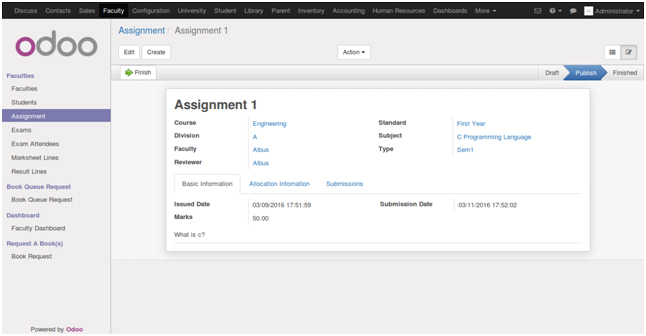
Assignment management system allows faculty to publish assignment to their students. Faculty can create new assignment with details like issue date, submission date, marks, student allocation information, submission menu to review submitted assignments, etc. Faculty can accept, reject or ask changes in assignments. Student has to submit assignment within submission date.

  • A} Assignment
  • B} Student Assignment Submission