Monday, August 3, 2015

Pragmatic Odoo 8 SaaSKit V1.2

SaaSkit by Pragmatic

SaasKit is a state of art solution for cloud-based Software as a Service for Odoo 8 (formerly OpenERP) that can be easily adopted by SMEs. Companies can add different features or modules to the existing Odoo installation or system just by configurations and provide it in SaaS model to their Clients or end-users. ‘As-is’ installation of the SaaSKit would help any company to leverage on its pragmatic power in achieving SaaS advantage and strategically places them in the new found SaaS market.

SaaSKit enables companies to resell Odoo to multiple tenants in subscription model and thereby leverage on Odoo SaaS implementation at just click of a few buttons.

We use cutting edge technologies (Advanced Version- Need Based)
  1. Loose Coupling with segregation of lookup and transactional database
  2. Load balancing with nGinx, AWS EC2 Load Balancer - ELB
  3. Multiple installation based high availability – both on AWS Multi availability Zone as well
  4. Multiport Tenancy; user data discreteness (up to 4 Levels - Master, Tenant, Portal, Web store)
  5. Failover management with Database replication
  6. Database Connection Pooling for handling simultaneous users.

Salient features of Odoo SaaSKit V1.2

  1. SaaS Selling page – Odoo Web Commerce, Demo and Payment option.
  2. Multiple SaaS Product Configuration – Odoo Product Master – Bundled and BOM based
  3. Connection pooling for Master Database
  4. Load balancing by Multiport implementation of SaaSKit
  5. Custom Domain Support for each of Tenant Database
  6. Localization: Option of selecting Tenant user language at check out itself
  7. POS customization to be standalone with Sales front end.
  8. Automated SaaS Billing for Tenants based on requirement
    1. Per user per module per month (Ex: (module x month) x (number of users)
    2. Fixed price - Per module per month, User per month (module x month) + (user cost * number of users).
  9. Portal access for Tenant Account self management
  10. Payment gateway integration.
  11. MIS and Dashboards – SaaS Panel
  12. Device independence – BYOD
  13. State of art – SaaS Administration with SaaS Panel
  14. SaaSPanel Running Dashboards and reports
  15. SaaS Panel Administration with Activate/ Deactivate/ Terminate options for Tenant Database
  16. SaaS Tenant Technical Support option with Pseudo Admin.

Work flow

SaaSKit Terminologies

  1. SaaS Master/ Provider – Technology Company (SaaS Vendor) who sells Odoo in SaaS model
  2. SaaSKit Admin – The Admin account for SaaS Master
  3. SaaSKit Tenant – The end user of the Odoo installation (Each tenant has a unique Database)
  4. Tenant Admin – The admin user account for SaaS Tenant management

Installation of SaaSKit and Setup of Odoo Server

Preferred – always new instance (new Odoo with bare DB), installation to be done by Pragmatic.
  • If there is an Odoo installation that is already present with operational data and SaaSKit need to be added to make this instance as the SaaSMaster – we need to match Odoo Version with that of SaaSKit, that SaaS Module can be installed without errors. Not Preferred approach. 

SaaSKit - Databases

Default Dbs that gets installed with SaaSKit
  1. SaasMaster – Control Db to be created from DB creator (Odoo).
  2. Bare Tenant – Template DB – this is a need based database to easily replicate and create a new tenant. This can be more customized based on advanced editions

SaaSMaster Configuration.

Configure – General Settings.
Publish the SaaSKit Domain – useful for creating Sub-domain


SaaSPanel Configuration – Manage Tenant DB


SaaS Configuration


Email setting options

  1. Trial Period: Alert before No:of Days – Numeric Value (n) : : This would send email alert before ‘n’ days to the customer for starting the paid subscription.
  2. Paid Period: Alert before No:of Days (x) – Data base Expiration: This would trigger an email before ‘x’ days in paid period to remind the tenant of bill payment
  3. Grace Period: ‘y’, In Paid period, the tenant gets a ‘y’ number of grace period in days, of system usage even when the invoice is not paid. After Grace period the data base is rendered inactive
  4. Data Purging Days: ‘z’, would be the number of days after the grace period for which the database would be retained by the SaaS Provider after which it would be purged.
  5. Free Trial Period: The number of days for which the Free trial should work.


Figure 3: Settings with timeline

SaaS Product (Type)


SaaS Product allows the SaaSAdmin to create products in such a way, where there could be Base module and Addons on top of existing Base modules.

Once SaaS Product type selection enables the option to publish saas products as
  1. Base
  2. Addons
Free Trial Period: Configure the free trial period usage


Auto Process

SaaSKit can be operated in two models – with SaaSAdmin approval and manual mode of processing requests for Topups, bill payments addition and removal of users.

Auto Process is the option added to automatically process the top up without SaaS Admin or manual intervention for 3 of the following options for all existing tenants
  1. Topup
  2. Bill payments
  3. Addition and Removal of users
Here whence the check boxes are true – the processing would be automatic and the tenant can see the results on the instances instantaneously.

Billing Type


Friday, July 31, 2015

Pragmatic TechSoft Odoo Integration with Digium's SwitchVox For Inbound & Outbound Calls


Integrated with


Quick Overview


Pragmatic Techsoft has come up with Odoo Integrated with Digium's Switchvox. Switchvox is asterisk based but has its own API. We have designed and Integrated Swichvox API with Odoo. Now Odoo has complete integration for inbound and outbound calls. Switchvox can trigger a post to Odoo on all calls, or at any other event, such as on call answer, on incoming call, on outgoing call, etc... 

For Example Odoo CRM track all call statistics in relation to campaigns - Shows activity history and reporting on calls by campaign, can be stored in lead records and campaign records. Even if call isn’t answered, call can be logged as incomplete or missed it can then trigger work flow rules to ensure these calls are followed up.
This Integration will help in Improving Customer Experience, optimize business processes. Integrated system will be more complete and can be integrated with other business processes, an organization is able to substantially increase its effectiveness – and cost savings. Increase Your Employee Productivity and ROI.


About Switchvox


Switchvox is Digium's family of VoIP (Voice Over IP) Phone Systems for small and medium businesses. Switchvox systems are designed to be easy to use, full of helpful features and cost less than a traditional PBX. 

Switchvox is easily managed with the Switchboard, a unique web based, real-time call control panel that gives you the flexibility you need to keep your office connected. 


Key Features


Here are some key features of Odoo Switchvox Integration which can be configured & customized as per clients requirement:

Key Features:
  • Integrated Digium's Switchvox API with Odoo
  • Integration for inbound and outbound calls.
  • It supports browser base soft Phones and Digium IP Phones and X-lite etc...
  • Switchvox can trigger a post to Odoo on all calls, or at any other event, such as on call answer, on incoming call, on outgoing call, etc
  • Integration to track call statistics - Shows activity history and reporting on calls
  • Even if call isn’t answered, call can be logged as incomplete or missed it can then trigger work flow rules to ensure these calls are followed up.
  • Integration can be used for all Modules of Odoo.
    • CRM Inbound & Out bound Calls
    • Call Center
    • Issue Management
    • Follow up calls.


Odoo Work Flow For Calls integrate with Digium's Switchvox


Switchvox parameter settings on Odoo Configuration
  • Extension configuration for Inbound / Outbound  Calls on Odoo
  • Each Extension is mapped to Odoo User who is authorized to take calls.


Inbound Calls

1) Inbound Call notification on Odoo


2) Track call from previous customer / Leads / Contacts and Extracting records  from Odoo.


3) New Calls, it will pup up Lead screen where new call details are captured.


Outbound Calls

1) Outbound calls through Switchvox Soft Phones, Adding Manual Notes


2) Call Summary – Adding notes on call logs


Odoo 9 Community and Enterprise Edition

Odoo 9 - The next generation of Open source business suite of applications

Odoo at its yearly conference Odoo Experience 2015 unveiled and showed a glimpse of its new version Odoo 9. From the outset the new version looks very promising. It adds a number of very interesting features which I am going to review over here. Also their is an imminent change of business model which has not been officially declared but unconfirmed sources update that the release of the new version 9 will actually have 2 different versions of Odoo namely Enterprise and Community. The new business model is very similar to what other companies in the commercial Open Source have implemented such as SugarCMN, Nagento and many more.

The new business model will enable Odoo to improve on  achieving higher revenues. Also Odoo has been promoting its App Store in a big way. After the launch of the Enterprise version it will enable contributors and customers to buy and sell modules. This can create a very interesting opportunities for vendors to put out interesting business apps.


Wednesday, July 15, 2015

Pragmatic Odoo OpenERP Shipping Management - Integration with FedEx, UPS and USPS

Pragmatic Techsoft has come up with Odoo Shipping Management which integrates Odoo delivery orders with worldwide couriers like FedEx,UPS and USPS in order to generate rate for shipping and Shipping Labels. This module will also allow to configure Customer Shipment Accounts Number Shipment Company and Country wise.

This is a comprehensive web based shipping integration module used for getting shipping charge details from shipping above agencies according to Service Type; Package Details; Packaging Type etc.

Here are some key features of shipping Integration which can be configured & customized as per clients requirement:

Key Features:

1) Integrated with FEDEX, UPS & USPS for Company & Customer / Partners.
2) Generating rate of shipping according to weight of delivery order, type of shipping service used and shipping agency selected for delivery of order.
3) Capable of managing the following scenarios in implementing Shipping charges
      3.1 Fixed Price billing for shipping service
      3.2 Billing at Actual
      3.3 Billing to Customer Account (no charges on Shipping – Billed to Customer Account)
4) Comparing Shipment Quote Rates received from different Shipping Companies.
5) Easy to select and generate Labels based on Quotes Rates Comparison.
6) Handling Charges management:
     6.1 Price Slabs for handling charges matrix
     6.2 Manual Update option in Invoice and auto JV
7) Auto Generation of Packing Lines base on Input:
No. of Package and Max. Weight Per Package.
8) Generates Labels along with tracking number , Bar code and Data Matrix code.
9) Download and Print shipping receipt.
10) Invoicing on actual rates to Customer and Supplier for AR & AP.
11) Shipping Analysis Report – List View – Group By
12) Shipping Analysis Report – Graph View – Bar / Pie Chat

Once user confirm sale order respective delivery order is generated from where user can select which shipping agency will be used to deliver order.


FEDEX / UPS / USPS 1.Generating Shipping Quotes for FedEx/UPS/USPS
Once delivery order is created user has to specify Weight of Delivery order;Shipping Type,Drop off Type,Packaging Type. When user click on Generate Shipping Quotes request is send to FedEx which returns cost of shipping according to specified weight and selected shipping Type.

2. Request to Generate Shipping Label for FedEx/UPS/USPS
Once user get shipping cost he can request to generate label of shipping i. e. Receipt of Shipping which is in image form that can be downloaded and printed any time.

3. Opening and Downloading Shipping Label For FedEx/UPS/USPS
4. Shipping Label For FedEx/UPS/USPS

5. Report – Shipping Analysis (In List / Graph View)

Group by shipping provider and so on...

Graph View

Graph View – Bar Chart

Graph View – Pie Chart

Friday, July 3, 2015

Deploy Odoo with Load Balancer in Amazon Web Services(AWS) Cloud

We, Pragmatic has leveraged on the power of Amazon Web Services for Odoo deployment for state of art and automated load balancing that meets effective and efficient resource utilization requirement of a high performing enterprise system.

 Conventional Odoo Deployment on AWS
Figure 1: Single Server Approach in AWS – Conventional

Overcome Odoo management challenges with Pragmatic approach
Odoo Challenges/ Bottleneck: The bottleneck in Odoo direct implementation on AWS is scaling and load balancing based on incoming traffic. The automation and deployment in a scaling environment would be best suiting the optimal usage of resources and highly pocket friendly. When load on Odoo server is not managed the system can get into a stalemate or impasse which needs to be overcome by releasing connections and server management through manual intervention.
Pragmatic has used Elastic Load Balancing (ELB) along with AWS EC2, in an optimized way to achieve this resilience (with loose-coupling and Enterprise Postgre for advanced implementations) when loads would be soaring.

Scaling Odoo with Multi server Multi Process
Pragmatic uses ‘Multi server Multi Process’ approach to achieve Scaling and Load balancing
Figure 2: Multi-Server with Load Balancing – High Scalability and Elasticity
What Is Elastic Load Balancing?
Elastic Load Balancing automatically distributes incoming traffic across multiple EC2 instances. You create a load balancer and register instances with the load balancer in one or more Availability Zones.

The load balancer serves as a single point of contact for all clients of the Odoo installation. This enables to increase the availability of Odoo across the user spectrum. We can add and remove EC2 instances from the load balancer as the needs change, without disrupting the overall flow of information.

Fail over
If an EC2 instance fails, Elastic Load Balancing automatically reroutes the traffic to the remaining running EC2 instances. If a failed EC2 instance is restored, Elastic Load Balancing restores the traffic to that instance.

Security
Elastic Load Balancing can also serve as the first line of defense against attacks on your network. You can offload the work of encryption and decryption to your load balancer so that your EC2 instances can focus on their main work.

Auto Scaling
Ensures that you are running the desired number of Odoo instances, even if an instance fails, and enables you to automatically increase or decrease the number of instances as the demand on the instances changes. If Auto Scaling is enabled with Elastic Load Balancing, instances that are launched by Auto Scaling are automatically registered with the load balancer, and instances that are terminated by Auto Scaling are automatically de-registered from the load balancer.

Features of Elastic Load Balancing
High Availability
You can distribute incoming traffic across your Amazon EC2 instances in a single Availability Zone or multiple Availability Zones. Elastic Load Balancing automatically scales its request handling capacity in response to incoming Odoo traffic.

Health Checks
Elastic Load Balancing can detect the health of Amazon EC2 instances. When it detects unhealthy Amazon EC2 instances, it no longer routes traffic to those instances and spreads the load across the remaining healthy instances.

Security Features
When using Virtual Private Cloud (VPC), you can create and manage security groups associated with Elastic Load Balancing to provide additional networking and security options. You can also create a load balancer without public IP addresses to serve as an internal (non-internet-facing) load balancer.

SSL Offloading
Elastic Load Balancing supports SSL termination at the load balancer, including offloading SSL decryption from Odoo instances, centralized management of SSL certificates, and encryption to back-end instances with optional public key authentication.
Flexible cipher support allows you to control the ciphers and protocols the load balancer presents to clients.

Sticky Sessions
Elastic Load Balancing supports the ability to stick user sessions to specific EC2 instances using cookies. Traffic will be routed to the same instances as the user continues to access your Odoo.

IPv6 Support
Elastic Load Balancing supports the use of both the Internet Protocol version 4 and 6 (IPv4 and IPv6). IPv6 support is currently unavailable for use in VPC.

Layer 4 or Layer 7 Load Balancing
You can load balance HTTP/HTTPS based Odoo instances and use layer 7-specific features, such as X-Forwarded and sticky sessions. You can also use strict layer 4 load balancing for Odoo instances that rely purely on the TCP protocol.

Operational Monitoring
Elastic Load Balancing metrics such as request count and request latency are reported by Amazon CloudWatch.

Logging
Use the Access Logs feature to record all requests sent to your load balancer, and store the logs in Amazon S3 for later analysis. The logs are useful for diagnosing Odoo failures and analyzing web traffic. You can use AWS Cloudtrail to record Elastic Load Balancing API calls for your account and deliver log files. The API call history enables you to perform security analysis, resource change tracking, and compliance auditing.

Tuesday, June 30, 2015

Odoo OpenERP 8 Sales and Purchase Forecast

This blog elaborates sales and purchase forecasting in Odoo 8. This modules considers sales and purchase quotations/ orders while computing forecast quantities.

Sales Forecast :

 Lets created some of the sales quotations or sales orders for future dates (for Month of Dec - 2015 ) through sales module.
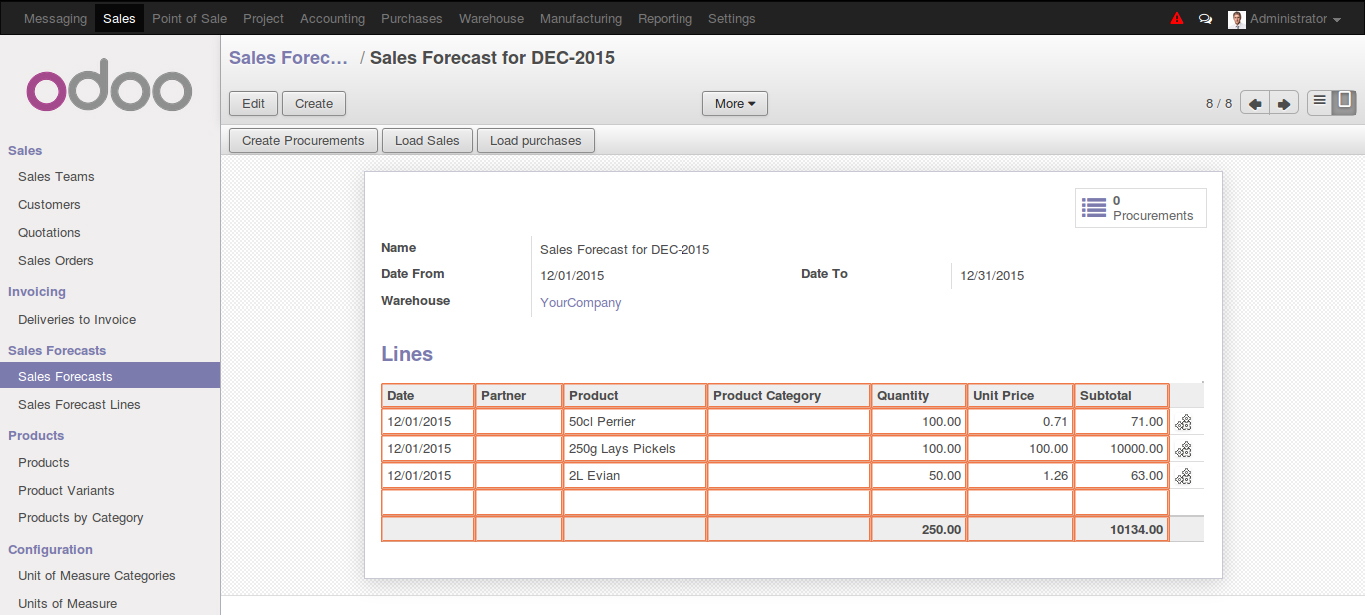
 User can create a Sales Forecast records for any date range in order to calculate total probable sales for given date range.
In form view user need to define a date range for which forecast records is created

 In order to load lines from the sales quotations and order when user clicks on “Load Sales” button, system pops up a wizard where filter criteria can be set
 As per the set criteria system loads list of products with cumulative quantity in different sales Quotations/ Orders ordered.
 User can generate a automated procurement from the above forecast by clicking on “Create Procurement” button
 PO is created when above procurement records are processed.
 Purchase forecast :

User can club all the purchase orders generated for a specific date range using purchase forecast.

 When clicked on “Load Purchases” it loads all the purchase lines for a given date range