Odoo 9 - The next generation of Open source business suite of applications
Odoo at its yearly conference Odoo Experience 2015 unveiled and showed a glimpse of its new version Odoo 9. From the outset the new version looks very promising. It adds a number of very interesting features which I am going to review over here. Also their is an imminent change of business model which has not been officially declared but unconfirmed sources update that the release of the new version 9 will actually have 2 different versions of Odoo namely Enterprise and Community. The new business model is very similar to what other companies in the commercial Open Source have implemented such as SugarCMN, Nagento and many more.
The new business model will enable Odoo to improve on achieving higher revenues. Also Odoo has been promoting its App Store in a big way. After the launch of the Enterprise version it will enable contributors and customers to buy and sell modules. This can create a very interesting opportunities for vendors to put out interesting business apps.
Pragmatic Techsoft has come up with Odoo Shipping Management which integrates Odoo delivery orders with worldwide couriers like FedEx,UPS and USPS in order to generate rate for shipping and Shipping Labels. This module will also allow to configure Customer Shipment Accounts Number Shipment Company and Country wise.
This is a comprehensive web based shipping integration module used for getting shipping charge details from shipping above agencies according to Service Type; Package Details; Packaging Type etc.
Here are some key features of shipping Integration which can be configured & customized as per clients requirement:
Key Features:
1) Integrated with FEDEX, UPS & USPS for Company & Customer / Partners.
2) Generating rate of shipping according to weight of delivery order, type of shipping service used and shipping agency selected for delivery of order.
3) Capable of managing the following scenarios in implementing Shipping charges
3.1 Fixed Price billing for shipping service
3.2 Billing at Actual
3.3 Billing to Customer Account (no charges on Shipping – Billed to Customer Account)
4) Comparing Shipment Quote Rates received from different Shipping Companies.
5) Easy to select and generate Labels based on Quotes Rates Comparison.
6) Handling Charges management:
6.1 Price Slabs for handling charges matrix
6.2 Manual Update option in Invoice and auto JV
7) Auto Generation of Packing Lines base on Input:
No. of Package and Max. Weight Per Package.
8) Generates Labels along with tracking number , Bar code and Data Matrix code.
9) Download and Print shipping receipt.
10) Invoicing on actual rates to Customer and Supplier for AR & AP.
11) Shipping Analysis Report – List View – Group By
12) Shipping Analysis Report – Graph View – Bar / Pie Chat
Once user confirm sale order respective delivery order is generated from where user can select which shipping agency will be used to deliver order.
FEDEX / UPS / USPS
1.Generating Shipping Quotes for FedEx/UPS/USPS
Once delivery order is created user has to specify Weight of Delivery order;Shipping Type,Drop off Type,Packaging Type. When user click on Generate Shipping Quotes request is send to FedEx which returns cost of shipping according to specified weight and selected shipping Type.
2. Request to Generate Shipping Label for FedEx/UPS/USPS
Once user get shipping cost he can request to generate label of shipping i. e. Receipt of Shipping which is in image form that can be downloaded and printed any time.
3. Opening and Downloading Shipping Label For FedEx/UPS/USPS
4. Shipping Label For FedEx/UPS/USPS
5. Report – Shipping Analysis (In List / Graph View)
We, Pragmatic has leveraged on the power of Amazon Web Services for Odoo deployment for state of art and automated load balancing that meets effective and efficient resource utilization requirement of a high performing enterprise system.
Conventional Odoo Deployment on AWS
Figure 1: Single Server Approach in AWS – Conventional
Overcome Odoo management challenges with Pragmatic approach
Odoo Challenges/ Bottleneck: The bottleneck in Odoo direct implementation on AWS is scaling and load balancing based on incoming traffic. The automation and deployment in a scaling environment would be best suiting the optimal usage of resources and highly pocket friendly. When load on Odoo server is not managed the system can get into a stalemate or impasse which needs to be overcome by releasing connections and server management through manual intervention.
Pragmatic has used Elastic Load Balancing (ELB) along with AWS EC2, in an optimized way to achieve this resilience (with loose-coupling and Enterprise Postgre for advanced implementations) when loads would be soaring.
Scaling Odoo with Multi server Multi Process
Pragmatic uses ‘Multi server Multi Process’ approach to achieve Scaling and Load balancing
Figure 2: Multi-Server with Load Balancing – High Scalability and Elasticity What Is Elastic Load Balancing?
Elastic Load Balancing automatically distributes incoming traffic across multiple EC2 instances. You create a load balancer and register instances with the load balancer in one or more Availability Zones.
The load balancer serves as a single point of contact for all clients of the Odoo installation. This enables to increase the availability of Odoo across the user spectrum. We can add and remove EC2 instances from the load balancer as the needs change, without disrupting the overall flow of information.
Fail over
If an EC2 instance fails, Elastic Load Balancing automatically reroutes the traffic to the remaining running EC2 instances. If a failed EC2 instance is restored, Elastic Load Balancing restores the traffic to that instance.
Security
Elastic Load Balancing can also serve as the first line of defense against attacks on your network. You can offload the work of encryption and decryption to your load balancer so that your EC2 instances can focus on their main work.
Auto Scaling
Ensures that you are running the desired number of Odoo instances, even if an instance fails, and enables you to automatically increase or decrease the number of instances as the demand on the instances changes. If Auto Scaling is enabled with Elastic Load Balancing, instances that are launched by Auto Scaling are automatically registered with the load balancer, and instances that are terminated by Auto Scaling are automatically de-registered from the load balancer.
Features of Elastic Load Balancing
High Availability
You can distribute incoming traffic across your Amazon EC2 instances in a single Availability Zone or multiple Availability Zones. Elastic Load Balancing automatically scales its request handling capacity in response to incoming Odoo traffic.
Health Checks
Elastic Load Balancing can detect the health of Amazon EC2 instances. When it detects unhealthy Amazon EC2 instances, it no longer routes traffic to those instances and spreads the load across the remaining healthy instances.
Security Features
When using Virtual Private Cloud (VPC), you can create and manage security groups associated with Elastic Load Balancing to provide additional networking and security options. You can also create a load balancer without public IP addresses to serve as an internal (non-internet-facing) load balancer.
SSL Offloading
Elastic Load Balancing supports SSL termination at the load balancer, including offloading SSL decryption from Odoo instances, centralized management of SSL certificates, and encryption to back-end instances with optional public key authentication.
Flexible cipher support allows you to control the ciphers and protocols the load balancer presents to clients.
Sticky Sessions
Elastic Load Balancing supports the ability to stick user sessions to specific EC2 instances using cookies. Traffic will be routed to the same instances as the user continues to access your Odoo.
IPv6 Support
Elastic Load Balancing supports the use of both the Internet Protocol version 4 and 6 (IPv4 and IPv6). IPv6 support is currently unavailable for use in VPC.
Layer 4 or Layer 7 Load Balancing
You can load balance HTTP/HTTPS based Odoo instances and use layer 7-specific features, such as X-Forwarded and sticky sessions. You can also use strict layer 4 load balancing for Odoo instances that rely purely on the TCP protocol.
Operational Monitoring
Elastic Load Balancing metrics such as request count and request latency are reported by Amazon CloudWatch.
Logging
Use the Access Logs feature to record all requests sent to your load balancer, and store the logs in Amazon S3 for later analysis. The logs are useful for diagnosing Odoo failures and analyzing web traffic.
You can use AWS Cloudtrail to record Elastic Load Balancing API calls for your account and deliver log files. The API call history enables you to perform security analysis, resource change tracking, and compliance auditing.
This blog elaborates sales and purchase forecasting in Odoo 8. This modules considers sales and purchase quotations/ orders while computing forecast quantities.
Sales Forecast :
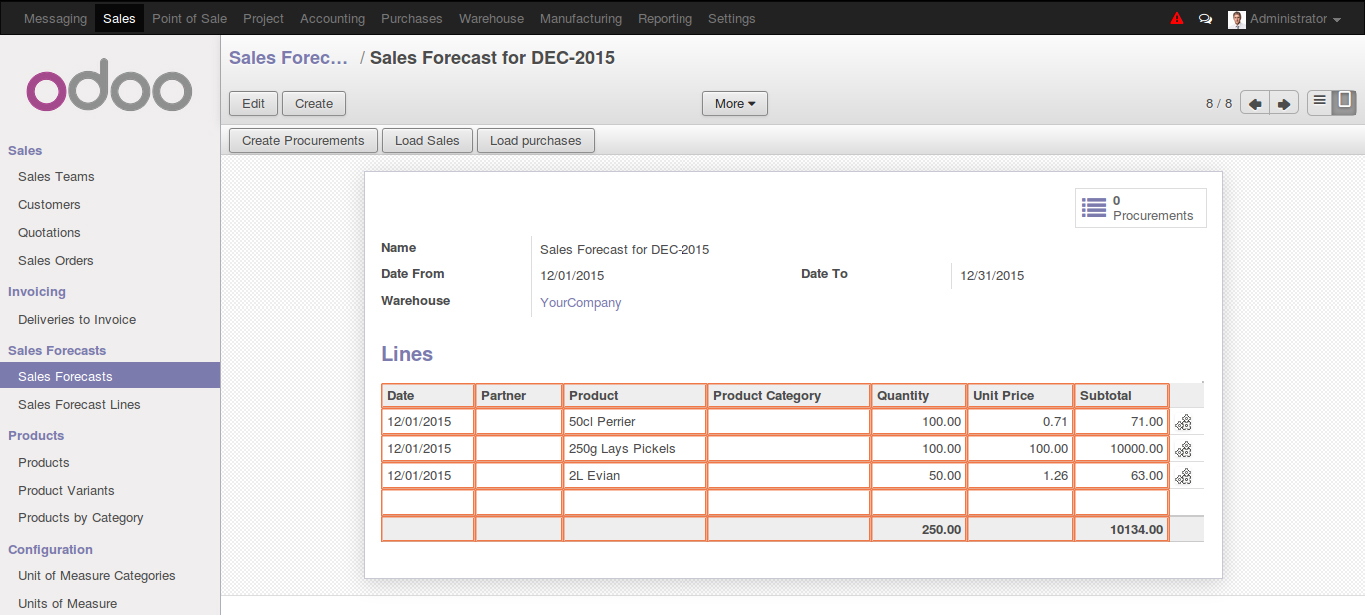
Lets created some of the sales quotations or sales orders for future dates (for Month of Dec - 2015 ) through sales module.
User can create a Sales Forecast records for any date range in order to calculate total probable sales for given date range.
In form view user need to define a date range for which forecast records is created
In order to load lines from the sales quotations and order when user clicks on “Load Sales” button, system pops up a wizard where filter criteria can be set
As per the set criteria system loads list of products with cumulative quantity in different sales Quotations/ Orders ordered.
User can generate a automated procurement from the above forecast by clicking on “Create Procurement” button
PO is created when above procurement records are processed.
Purchase forecast :
User can club all the purchase orders generated for a specific date range using purchase forecast.
When clicked on “Load Purchases” it loads all the purchase lines for a given date range
Introduction
The market leader in efficient and cost effective solutions for Business situations – Pragmatic Techsoft has made a mark in the Construction Industry! The Pragmatic Odoo Construction Management is a turn-key solution that suits, across-the-board, Companies involved in Construction and related activities. The solution can be custom configured for Developers, Builders, Contractors, Subcontractors based on need.
Use of cutting edge technology to structure the workflows and management of construction related activities based on established standards and management methodologies are the highlights of Pragmatic Construction Module. Odoo (formerly OpenERP) is fine tuned to accommodate the depths of detailing required in charting BOQs, Estimates and Plans, setting schedules, to the rigorous tracking and control of projects, use of budgets and forecasts are a few points to highlight.
In this write-up we describe the generic workflow of the Pragmatic Odoo Construction Management vertical with references to the standards and process that is included within our module.
Major Points Covered
• BOQ Generation
• WBS Online Estimation
• Project-based costing
• Project Task/ Job progress tracking
• Online project configuration
• Inventory control and material management
• Resource scheduling
• Contractor and subcontractor management
• Service and dispatch management
• Budget management and cash flow projections
Pragmatic Construction – Approaches
Define the Project and Proceed
Project Templates
Here we can utilize the powerful Template which we had designed based on the Standard measures and Common Arrangement of Work Sections
BOQ Generation
A bill of quantities (BOQ) is a document used in tendering in the construction industry in which materials, parts, and labor (and their costs) are itemized. Using Pragmatic Construction module, the BoQ document can easily be prepared by the cost consultant/ quantity surveyor; to provide project specific measured quantities of the items of work identified by the drawings and specifications.
Priced bill of quantities
The contractor tenders against the bill of quantities, stating their price for each item. This priced bill of quantities constitutes the tenderer's offer.
Method of Measurement:
The construction module is based on the approaches that are most commonly practiced in accordance with the Standard Method of Measurement SMM7/ New Rules of Measurement (NRM) which is configurable.
BOQ Standard measures based on Common Arrangement of Work Sections (CAWS)
The Pragmatic Construction module provides a list of BoQ items based on international standards and can still be customized as per the requirement of the project.
A - Preliminaries and general conditions.
B - Complete buildings, structures and units.
C - Existing site, buildings and services.
D - Groundwork.
E - In situ concrete and large precast concrete.
F - Masonry.
G - Structural carcassing, metal and timber.
H - Cladding and covering.
J - Waterproofing.
K - Linings, sheathing and dry partitioning.
L - Windows, doors and stairs.
M - Surface finishes.
N - Furniture and equipment.
P - Building fabric sundries.
Q - Paving, planting, fencing and site furniture.
R - Disposal systems.
S - Piped supply systems.
T - Mechanical heating, cooling and refrigeration systems.
U - Ventilation and air conditioning systems.
V - Electrical systems.
W - Communications, security, safety and protection systems.
X - Transport systems.
Y - General engineering services.
Z - Building fabric reference specification.
Pragmatic Construction module gives the users flexibility of use while defining BoQ. Bills of quantities can be prepared elementally or in works packages, by a process of 'taking off' which involves identifying elements of construction works that can be measured and priced.
Construction Project Tasks based on the WBS – Packages
What is Construction work packaging
Packaging is normally associated with splitting a large project into a series of work packages suitable for obtaining tenders and placing orders with the subcontracting and goods supply chain thereby transferring risk for delivering some elements of the works to others.
Typical breakdown of packages (excluding preliminaries) on an office development
• Demolition and site clearance.
• Piling.
• Substructure and underground drainage.
• Superstructure.
• Cladding system.
• Roof and balcony finishes.
• Floor and staircase screeds.
• Mechanical installations and plumbing.
• Electrical installation.
• Raised access floors.
• Suspended ceilings.
• Metalwork and balustrades.
• Brick and blockwork.
• Prefabricated toilets.
• Internal partitions.
• Joinery and ironmongery.
• External works.
• Decoration.
• Testing and commissioning.
• General building work including plastering.
WBS and Estimation
The construction manager and accountant should review the plans and make detailed estimates for labor, materials and construction overhead. Optionally time estimates can also be made in some detail, because cost is a function of time. Projects that fall behind schedule invariably go over budget.
Traditional financial accounting is historical -- it tells you what has happened. In construction, in order to control costs, procedures must be in place that also forecast future costs.
Sample: 4 Level WBS
Level 1: is the highest level (ACME) where the project (house) will be summarized
Level 2: is identified at the project level: House. It corresponds to Level 1. In this case, the code is 1.1.
Level 3: Divide the work into the major elements needed to build a house. We divide Level 3 into six elements: concrete, framing, plumbing, electrical, interior and roofing. These are both major deliverables and milestones for managing the project. They also enable the project by task.
Each codes at level 3 is unique to the project and starts with the WBS code from the level above (1à1.1à1.1.1).
Level 4: of the WBS will enable us to manage the project as desired. All of our resources and contractors fit into elements at level 4, and so do all specific departments.
Now we arrive at the complete Construction work package
The WBS dictionary
is a narrative documentation of the effort needed to accomplish all work defined in the WBS. The WBS dictionary is developed for the lowest level element in the WBS only
WBS Dictionary describes each component of the WBS e.g.
•Milestone
•Deliverables
•Activities
•Scope
•Resources
•Quality
•Cost
•Dates (Optional/ Need based)
Now that the Project is defined and set to roll, Pragmatic Construction module captures all the relevant operations at real time.
Task – Consumption
The stock is moved to the location of construction (ex Project 1: Location Store) and then from each task the items required are requested for consumption.
Here there are 3 cases that are handled
1.Item available at Project location
2.Item available at Company store/ any other location
3.Item need to be procured. Case 1: If available at location then the item is issued for consumption against the task and a track of actual Vs. estimate is also maintained. Case 2: If available at a different location then –Material Indent is raised and an internal move/ intercompany transfer is triggered based on the case. Case 3: If stock is not available then a Purchase Indent is raised and then it moves through the purchase cycle.
Task linked to OBS
Each task is linked to the OBS and calculates the actual time spend in each Task – thereby giving an exact expense Vs estimate figures and an appropriate actual of works and expenditure.