Friday, May 30, 2014

Odoo OpenERP 7 - Payment Express Integration

Tough Odoo OpenERP provides Paypal integration in default, many of the customers may not have Paypal account. Pragmatic Techsoft Pvt. Ltd. has developed a new module to facilitate user to pay customer invoices using “Payment Express” gateway.

User can also see payment transactions online on Payment Express website. User can mark payment methods as Credit Card so that on selection of concerned payment method system asks for credit card details and validate information though Payment Express API. It also maintains transaction id with provided by the payment express gateway.
(Note : Odoo OpenERP does not store any credit card details for security purpose)
Following are the features available with Payment Express gateway integration :
1) Provision to assign Payment Express gateway credentials

2) Mark payment method as credit card method

3) Payment mode selection on customer payment and credit card Information capturing on payment record


4) Capturing transaction ID generated from Express Payment

5) Online tracking of credit card transaction

Thursday, May 29, 2014

Odoo OpenERP 7 POS Credit Sales and Customer handling

Point of sale is the place where a retail transaction is completed. It is the point at which a customer makes a payment to the merchant in exchange for goods or services. At the point of sale the retailer would calculate the amount owed by the customer and provide options for the customer to make payment. The merchant will also normally issue a receipt for the transaction.

Some times the Retailer will also need options for credit sales. Hence , Pragmatic has developed the feature where credit POS transactions can be done.

The following are a few details.

1. A check box to indicate if the sale is credit. Also a field is provided to enter the name of the customer whom the products are being sold on credit.

2. Once the users checks the option , a POS invoice is created with “CreditSale” stage.

3. Accounting entries for credit sale. The amount to be posted is “zero” as the sale is credit sale.

At the time of credit sale , and also while printing receipts , there is need to enter the name of the customer. Some times the customer record is not present in the system. At such times , one would need the functionality to create customer record from POS screen itself.

A button is provided to create a new customer. 
The user needs to fill the customers name and mobile number and the click on “Create” button.
 

On validating the order , the customer record can be seen in the customers list .

Friday, May 16, 2014

Odoo OpenERP 7 Master Production Schedule - Make to order in OpenERP

Master Production Schedule module is designed to help manufacturers develop an attainable schedule while balancing internal constraints and limited resources and acheiving Advanced Planning and Scheduling. MPS for Make to Order enables to Schedule the production against Sales Orders. MPS balances machine capacity and aknowladges labor to develop a realistic plan of action to move production through various operation steps of Sales Orders to be delivered and gives the realistic delivery dates. The user benefit is that generated schedules are realistic and achievable on the plant floor because the production constraints on the plant floor are considered and modeled.

Key Features
1)  After selecting the Sales Order, Start date and Delivery date automatically populates
2) Start Date can be changed so the delivery date changes accordingly
3)  Track each Sales Order through each respective routing step and know where each part should be at any particular time.
4)   Keep track of all required resources for each manufacturing step and know the availability of each resource at any particular time.
5)  Represent time in a detailed manner (e.g. minute by minute). Machine run time can be defined as - per hour
7)  Schedule orders (i.e. manufacturing steps) only when resources are available.
8)  Detailed working Time for work centers.
9)  Consideration of preventative maintenance (Resource Leave) and other machine down time in Scheduling.
10)  Can be Scheduled against single Sales Order or Sales Orders for perticular period
11)  Routing selection is provided at the time of Schedule generation
12)  Multiple Tentative Schedules can be generated and changed before freezing it.

In Open ERP we have developed the module for managing the MPS for Make to Order.
Pre requisites for MPS are Sales Orders, BOM, Operations, Work centers, Routing, Resource Working Time, Reasource Leave (Down Time).

Sales Order
Sales Order S001 is recorded in the system.
MPS Record
When Sales Order SO001 is selected for Schedule it gives start date and Delivery date automatic. Start date can be changed so the delivery date changes accordingly

Schedule Details
When we schedule the sales Order it gives the Schedule Details

Manufacting Order
When we confirm the schedule it gets freezed and the concerned Manufacting Order gets generated.

When we confirm the Manufacting Order, corresponding Work orders gets generated for each of the operation.

Saturday, May 10, 2014

Odoo OpenERP 7 Master Production Schedule - Make to stock in OpenERP

Master Production Schedule module is designed to help manufacturers develop an attainable schedule while balancing internal constraints and limited resources and acheiving Advanced Planning and Scheduling. MPS for Make to Stock enables to Schedule the production against stock. MPS balances machine capacity and aknowladges labor to develop a realistic plan of action to move production through various operation steps. The user benefit is that generated schedules are realistic and achievable on the plant floor because the production constraints on the plant floor are considered and modeled.

Key Features
1) Track each Production Order through each respective routing step and know where each part should be at any particular time.
2) Keep track of all required resources for each manufacturing step and know the availability of each resource at any particular time.
3) Represent time in a detailed manner (e.g. minute by minute). Machine run time can be defined as - per hour
4) Schedule orders (i.e. manufacturing steps) only when resources are available.
5) Detailed working Time for work centers.
7) Consideration of preventative maintenance (Resource Leave) and other machine down time in Scheduling.
8) Can be Scheduled for any of the month
9) Routing selection is provided at the time of Schedule generation
10)Multiple Tentative Schedules can be generated and changed before freezing it.
11)Multiple products can be scheduled in one Schedule Plan


In OpenERP we have developed the module for managing the MPS.
Pre requisites for MPS are BOM, Operations, Work centers, Routing, Resource Working Time, Reasource Leave (Down Time).

MPS Record
When we created a MPS record to schedule the product 2909 Assembly, either we can plan for a month or for entire year.
Schedule Details
When we schedule after entering the quantity, we got the following schedule details with the advaced scheduled date and time along with the resoureces. So it gives us scheduled start date and scheduled end date considering the in between operation timings.
When we confirm the schedule it gets freezed and the concerned Manufacting Order gets generated.
When we confirm the Manufacting Order, corresponding Work orders gets generated for each of the operation.

Friday, April 25, 2014

Odoo OpenERP 7 Hijri Calendar

Due to the vast domain and and its flexibilty amoung various nations ,OpenERP's current adoption of Gregorain Calender can't be confined to ease its expliotation. Localization (globalization) of OpenERP has led to the essence of developing of widgets(sub-modules) that can potentially be adapted to various languages and regions.As we know different countries have different economic conventions, including variations in local Holidays,TimeZones,Jot representation etc , where it become mandatory to have local Calendars for meeting their Business Requirements.

Apart from Gregorain calendar their are many diffrent calendars used throughout the world synchronized with the cycle of the sun or the moon, infleuenced by Solar or Lunar Revolution and Rotations.We have tried to implement OpenERP 7 Widget that provides implementations of various world calendars and other additional functionality related to the calendars.Several world calendars can be implemented in OpenERP 7 .Here we are Depicting only the Demo of islamic calendar:

Islamic Calendar(Hijri Calendar) :
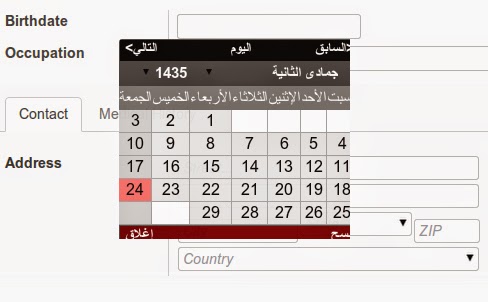
Commonly known as Hijri Calendar synched with moon(lunar) and mostly followed in all Muslim countries, orginated since AD 622 during the time of emigration of the Islamic Prophet Muhammad, known as the Hijrat, occurred.There is no year zero, time scale goes like 1 BH (-1) was followed by 1 AH (+1).Leap years follows after every 30 year cycle.Each year has 12 months of between 29 or 30 days and 354 or 355(leap year's) days in total.The week is starts with Yawm-Ahad (Sunday) and ends with Yawm As-sabt (Saturday).The first month of year is Muharram al Haram(المحرّÙ…) and ends with DhÅ« al-Ḥijja(ذو الحجّØ©).The current Islamic year is 1435 AH,(AH) prefix used with Hijri Calendar dates for differentaition.

Below screen-shot shows Islamic calender integrated in OpenERP 7 .
The Calendar is Designed in such a away that it displays the hijri dates as digits and the name of months and days in Arabic language.(That Can Be further customized To More then 50 Languages including English,Persian,Urdu, Thai , Nepali , Ethopian , Julian, Hebrew and Hindi). The Calendar works same way as the inbuilt Gregorian calendar does.

Monday, April 21, 2014

Odoo OpenERP 7 Training Management

Training and career development are very vital in any company or organization that aims at progressing. Training simply refers to the process of acquiring the essential skills required for a certain job. It targets specific goals, for instance understanding a process and operating a certain machine or system. Career development, on the other side, puts emphasis on broader skills, which are applicable in a wide range of situations. This includes decision making, thinking creatively and managing people.

1. Creating Training cost.
This is to configure the training cost per person. 

2. Creating Training Modules for training.
The training module is created with the details like name of the training Module , type of training , Location , cost , Details of the Institute who is providing training , etc. 

3. The training can be initiated by the Manager , HR or the Employee himself.
4. After the manager initiates the training , it is confirmed by the HR.
5. After the HR , the training is confirmed by the Employees.
6. Once All the employees confirm / refuse the training , then training details are sent to the finance Manager for Final approval.
7. After the Finance manager approves the training , the training is booked .
8. Similarly , the flow is maintained for Employee initiated Training and HR initiated training,
9. In the training records , the amount of training per person is maintained. Depending on the no. Of employee approvals and employee Refusals , the training amount per person is calculated.

Monday, April 14, 2014

Odoo OpenERP 8 Features

This blog mentions some of changes which are made in OpenERP Version 8 as Compared to Version 7.

1. HR Module Changes
In HR modules (as well as in other modules like sale,project) “State” concept is removed and now we only have Stages which i think 

Removed Concept of State on Hr Application . Now only Stages are available by Default NEW is Stage. This allows to group and analyze the time spend in the various stages.

Similar change has been done for project issues and CRM leads where state is removed. Now we have only stage which determines on which state current record is.


Added template_id field. If an email template is linked to the stage, it is used to render and post a message on the applicant. This allows for example to have template for accepted or refused applicants. 

 
1.1 Reporting
In Version 8 reporting feature is more dynamic which makes user to change format of report easily and has option to use different filters easily. 
 

2. CRM 
2.1 Teams Management
This feature allows user to create team and track their progress in terms of Leads;Sales Orders and Invoice . It provided easy interface for team management and performance tracking. 
 
2.2 Mass Mail
This is again a good feature for CRM where users can create campaign and send mass emails. It also allow users track emails visibility.  
 
2.3 Live Chat
OpenERP 8 provides live chat option to directly chat with your customer in Real Time.  
 
3. Accounting:
3.1 Paypal
OpenERP version 8 provides interface to configure paypal and allow option to make payment from Paypal. In Version 8 you can configure company paypal account and you get option to register payment from Sells Order directly.  
 
Paypal Option on Sells order form
Similar Option is Provided for Ogoan and Adyen 

3.2 Bank Reconciliation
Advance option to bank reconciliation is provided. 
 
4. Website
OpenERP 8 comes up with this feature of web where users can design and manage content of their website . This Option provide and option to Manage web content;Products and other details which is generally put on any company website.  
 
5. Display Option in Search
Display option in search gives user an option to add extra column in tree view.