Wednesday, April 6, 2016

Odoo 9 Pathology Lab Management System

With Odoo 9 Pathology Lab Management System, Pragmatic has launched another new and advanced Product in the field of Pathology Lab Management. This Product comes with many features like Patient information Management, Appointment Management, Laboratory Management, and Invoices Management.

 
Following are some features of Pathology Lab Management.

1. Lab Testing Unit are pre-configured in the system.
2. Lab Testing Types are pre-configured in the system

3. Patients details can be maintained along with Lab Tests Undertaken.

4. Patient Appointments for lab test can be booked.

5. System manages the details of the entire Pathology clinic.

6. Details of all the Physicians related to Pathology clinic are maintained.

7. Medical Specialities are also managed.

8. Lab Requests are managed in the System.

9. Lab Tests Results are managed in the systems as well.

10. Reports in Appointment

11. Patients Report

12. Lab Test Result Report

13. Pathology Clinic Report

Wednesday, March 23, 2016

Pragmatic Techsoft and Maharashtra Institute of Technology, (MIT), Pune joins hand to develop new generation of IoT Products in the cloud.


Pragmatic CEO, Shabbir Merchant along with Dr Mangesh Karad, 
Secretary and Trustee, MIT Group of Institutions


March 23,Pune india
Pragmatic Techsoft Pvt Ltd has been a leading provider of open source enterprise solutions for over 7 years. MIT College of Engineering, Department of Information Technology, Center of Excellence has joined hands with Pragmatic Techsoft Pvt Ltd to jointly develop next generation Amazon AWS IoT cloud based applications. In the future both institutions plan to work on integration of IoT with Enterprise software such as Odoo ERP. Also in the works is to build a Analytics Engine which can learn from IoT data and make predictions to solve problems in Manufacturing, Warehouse and other verticals.

Sunday, March 20, 2016

Odoo 9 University Management System

Odoo University Management System By Pragmatic Techsoft is now available in the latest Odoo Version (Odoo 9).

University management system module manages the whole process of student admission till pass out from the college/school, like Admission, Exams, Time Table, Student Assignment, Hostel, Library, Transport, etc. Using this system, searching student information is just a few clicks away. System also generates various reports.


System allows user to initiate admission process with an information like fees, due date for fees, academic year, category, course, etc. It allows user to generate invoice against admission.
Student management system allows you to store complete information of student like date of birth, religion, category, blood group, mother tongue, address, educational details, assignment details, library details, placement offer details, etc. This allows you to find student information at one click.

Faculty management system allow you to store complete information of faculty like birth date, blood group, contact number & address, time table, library details, subject details, health details, etc. This system manages the payroll of faculty.

Course management system allows you to define courses which has granted by the university for the students. You can also define section and subject under it.

Standard management allows user to define standards, it refers to students appearing in particular year for particular course. It also allows you to set division, it is nothing but separating batch of students in two or more groups. Allocation of division menu allows you to assign division to students.

Classroom management system allows you to allocate classroom to students. Here you can set classroom name, course, standard, number of students per classroom and facilities available in the classroom.

Educational institute organizes cultural programs/activities, to track those activities system allows you to use activity management system. It has information like activity name, faculty & student name, activity type, etc.

Hostel management system allows user to maintain the records of hostels like list of hostels, number of rooms per hostels, number of students per room, facilities available per hostel, etc.

Most of the educational institutes uses transportation facility for their students and faculties. So to maintain all these data we use transportation management system here. It helps to manage vehicle information, driver information, route information, student and faculty list, stops and cost information.

Exam management system allows you to set exam type (for eg. Semester 1) and exam room. In exam room you can set classroom name, student capacity, course, standard and list of students.

General management allows you to define category (Caste), religion and scholarship for the students.

Academic year management allows user to define year and months for particular academic period like eg. for semester-1 the period will be from March to May.

Attendance management system is used to maintain the attendance of students using the filters like academic class, division and batch. You can maintain monthly and daily attendance of students. System also allows us to print monthly attendance report.

  • A} Monthly Attendance
  • B} Daily Attendance Sheet
  • C} Monthly Attendance Report
Educational institute charges some amount as fees for their academic, and management has to track the record of fees receipt, so fees management system helps to maintain these records. Here you can maintain fees receipt & payroll register records and define fees head and fees structure.

Time table management system allows user to generate time table for faculties and students. To generate time table, you need to define period with duration first. System also gives facility to generate time table. By default system shows time table in kanban view.

  • A} Period
  • B} Time Table List View
  • C} Generate Time Table
General management system covers following things, placement offer, student/faculty health, student hall ticket, admission analysis, student migration (promotion of one standard to another standard) and student achievement.

  • A} Placement Offer
  • B} Student/ Faculty Health
  • C} Student Hall Ticket
  • D} Admission Analysis Report
  • E} Student Migration
  • F} Achievement
In library we have to manage the books, there are n number books in the library. When we use any automated system in the library we have to insert book details in the system. So the book menu is there to add the book details in the book master list like book name, authors, publishers, tags, book request, book movement, etc.

  • A} Book
  • B} Book Movement
  • C} Book Request
  • D} Library Card
Educational institutes conducts exams for their students, to manage all exam related things like exam start time, end time, minimum marks, obtained marks, total marks, duration, venues, subject, exam sessions, manage exam attendance, mark-sheet register, exam template, exam resource allocation, etc. we use exam management system.

  • A} Exam
  • B} Exam Session
  • C} Mark-sheet Register
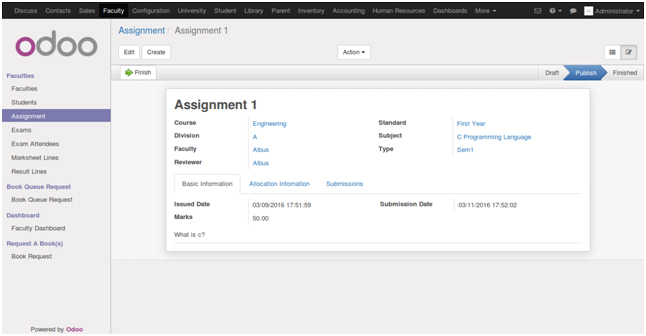
Assignment management system allows faculty to publish assignment to their students. Faculty can create new assignment with details like issue date, submission date, marks, student allocation information, submission menu to review submitted assignments, etc. Faculty can accept, reject or ask changes in assignments. Student has to submit assignment within submission date.

  • A} Assignment
  • B} Student Assignment Submission

Thursday, February 11, 2016

Odoo Load and Performance Testing with JMeter

Deatiled patient record is maintained in the system where genetic information, appointment history, life style details, lab test details etc of the patient is maintained.

1. Detailed Patient record.

Jmeter installation on Linux platform on ubuntu operating system.
a)- Run the below command on terminal for install Jmeter OR you can download the latest jmeter version and installed as below steps.
  1. 1-itadmin@IT:~$ sudo apt-get install jmeter
  2. http://www.gtlib.gatech.edu/pub/apache//jmeter/binaries/itadmin@IT:~$ sudo wget
    http://www.gtlib.gatech.edu/pub/apache//jmeter/binaries/apache-jmeter-2.13.tgz
itadmin@IT:~$ sudo tar -xvf apache-jmeter-2.13.tgz
itadmin@IT:~$ cd apache-jmeter-2.13
itadmin@IT:~/Downloads/apache-jmeter-2.13/bin$ ./jmeter.sh
After Installation open the Jmeter Like the below image.

Jmeter Configurations for the Odoo Load testing.

a)- Right click on test plan -> Add > Thereads(users) -> Theread Group
Thread Group
Name:-Thread Group (Default) As you like and understand,can change the Name
comments:
This is Sampler action options:-
Continue, Start next, Thread Loop, Stop Thread, Stop Test, Stop Test Now

Thread Properties:
Number of Threads(Users):- 1 (default) you can put numbers of users.Which will be he send the apache requests on odoo server. keep it 100
Ramp-Up period(in seconds): 1 (default) Send apache request every second
Loop Count:- 1 (Default) Send apache request on odoo server as per loop 1,2..
Delay Thread creation until needed:- No Need
Scheduler:- No Need

b)- Right click on Thread Group -> Add > Sampler -> HTTP Request
HTTP Request
Name: HTTP Request (Default) you can putt the Odoo-Http-Request
Comments:
Server Name od IP:- 52.91.247.154 ( odoo server ip)
Path:- / (This is linux root directory and set the path for the thread will access the under the /our server.)


Note - Other field is no need to configure.

c)- Right click on test plan -> Add -> Listener -> View Results Tree
Check Odoo server apache log
ubuntu@ip-172-31-32-56:~$ sudo tail -f /var/log/odoo/odoo-server.log
2016-02-10 13:55:03,317 23853 INFO iPaas_Odoo9
werkzeug: 127.0.0.1 - - [10/Feb/2016 13:55:03] "GET / HTTP/1.1" 200 -
2016-02-10 13:55:03,355 23853 INFO iPaas_Odoo9 werkzeug:
127.0.0.1 - - [10/Feb/2016 13:55:03] "GET / HTTP/1.1" 200 -
2016-02-10 13:55:03,368 23853 INFO iPaas_Odoo9 werkzeug:
127.0.0.1 - - [10/Feb/2016 13:55:03] "GET / HTTP/1.1" 200 -
2016-02-10 13:55:03,381 23853 INFO iPaas_Odoo9 werkzeug:
127.0.0.1 - - [10/Feb/2016 13:55:03] "GET / HTTP/1.1" 200 -


D)- Right click on test plan -> Add -> Listener -> aggregate graph
explanation of main performance load test metrics which are collected by JMeter look as below: Lable is apache (https OR http request)
Samples is the number of samples with the same label.
Average is the average time of a set of results.
Median is a number which divides the samples into two equal halves. Half of the samples are smaller than the median, and half are larger. [Some samples may equal the median.] This is a standard statistical measure. The Median is the same as the 50th Percentile.
90% Line
(90th Percentile) meaning 90% of the samples took no more than this time.
Min is the shortest time for the samples with the same label
Max is the longest time for the samples with the same label
Error % is the percent of requests with errors
Throughput is measured in requests per second/minute/hour. The time unit is chosen so that the displayed rate is at least 1.0. When the throughput is saved to a CSV file, it is expressed in requests/second, i.e. 30.0 requests/minute is saved as 0.5.
Kb/sec - throughput measured in Kilobytes per second. Time is in milliseconds.

Run Jmeter Configurations:-
Step-1

Save The file choose the location


Step-2

Step-3

Step-4
Aggregate Graph Report


Note- Successful jmeter send apache request om Odoo server Check result and Right Uper coner “0” Yellow Field and 0/100 success Green